They sound like the same word and they are deliberately different screens:
- Catalog — what you sell. Identities: brand, product name, weight.
- Inventory — what you have. Bins, units, value.
The nav used to say "Merchandise", which collided with Inventory for anyone new — colloquially
both mean "the stuff". The screen still lives at /merchandise and the old
/merch link still redirects here, so nothing you bookmarked has broken.
The toolbar keeps them apart on purpose, and so should you:
- Name suggestions — the AI name check thinks two spellings are the same product and has already merged them, pending your review. (Part 4.)
- Weight suggestions — an AI web lookup found a shipping weight and is waiting for you to approve it. Nothing can ship at it until you do. (Part 3.)
A reference section at the end sets out how a name is matched, what the AI may decide on its own, every weight state a row can be in, and what this screen cannot see.
Read the list
One table, grouped by brand, sized for a catalog far bigger than it looks on open.
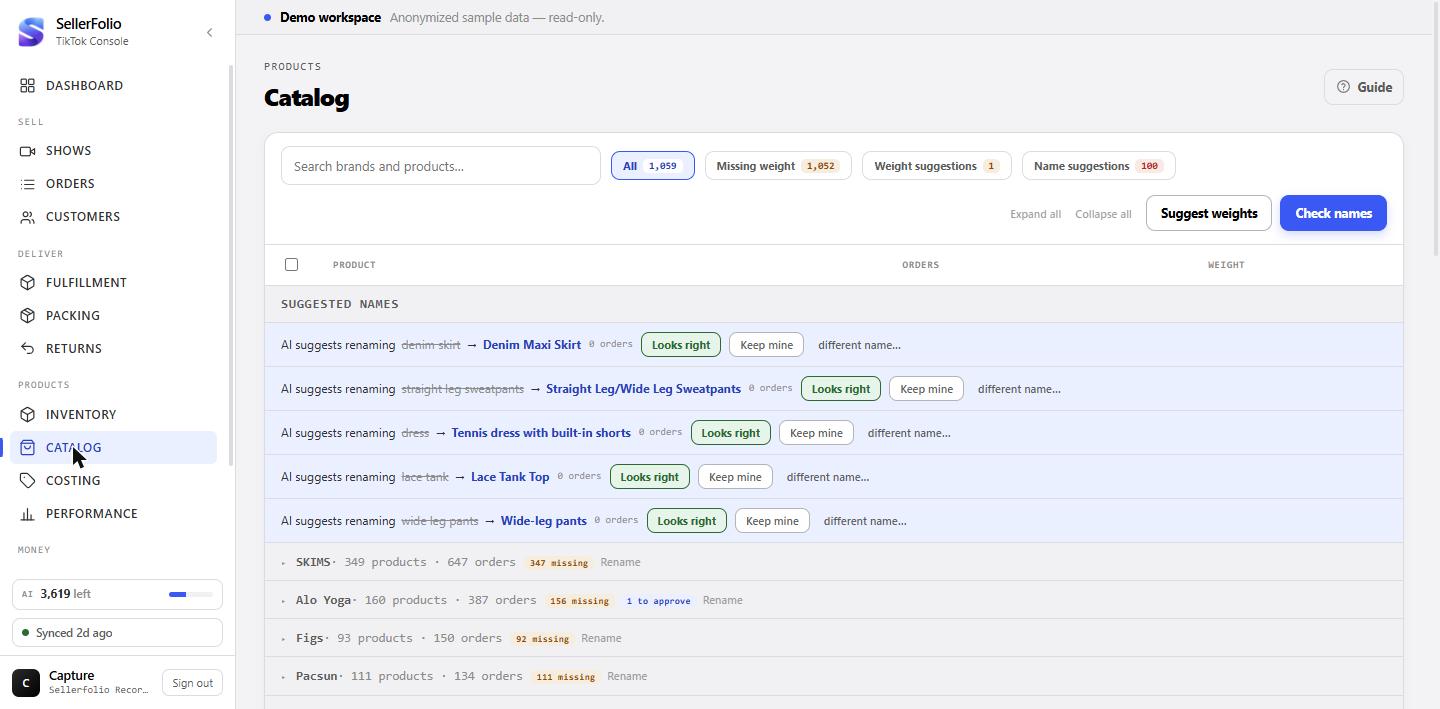
Everything starts closed, and that is the point
Brand groups are collapsed when the screen opens. A live-selling catalog runs to thousands of product identities across dozens of brands — opened at once that is a wall of rows nobody can read, so you open the brand you came for. Expand all and Collapse all are in the toolbar when you want the other extreme.
The moment you type in the search box or press a filter chip, the default flips: matching groups open themselves. A filter whose every match sat inside a shut drawer would read as "nothing found", which is the one thing a filter must never do. Close a group by hand while filtering and it stays closed — but clearing the filter resets that, so a group you shut mid-search does not come back as the one group left open.
What a brand header tells you
Next to the brand name: how many products it holds and how many orders they account for. Then, only when they apply, two counters — N missing (products in this brand with no weight at all) and N to approve (products with an AI weight suggestion waiting on you). Both count products, not weight entries, so a product with three sizes still counts once.
Rename on the header renames or merges the whole brand. A pending name suggestion about the brand itself stays visible even when the group is shut — it is a decision about the header, not about anything inside it.
The four chips, and what their numbers mean
All, Missing weight, Weight suggestions and Name suggestions. Each badge counts exactly the rows its own click would produce, so the number you read is the number you get.
The subtle one is Missing weight: a row counts as missing only when it has nothing on it — no approved weight and no pending suggestion. A row with a suggestion sitting on it is not missing, it is waiting on you. That is why a weight sweep makes "Missing weight" fall and "Weight suggestions" rise by the same amount, while nothing has become shippable yet.
Search matches brands and products differently
A search that matches a brand keeps that whole group; a search that matches a product keeps just the rows that matched. So typing a brand is how you get its complete list, and typing a product is how you find one thing across everything.
Weights you type yourself
The weight column is editable in place. A weight here is a number a carrier will eventually be told, so the screen is fussy about it in a few specific ways.
You type pounds; we store grams
The field is pounds — that is what the lb beside it is for. A bare number
is always pounds, never grams: typing 12 means twelve pounds. It is stored in
grams and sent to TikTok in pounds, which is why the same figure can look slightly
different in different places without anything being wrong.
Adding the first weight
A product with no weight shows an amber + Add weight pill. It opens a row under the product with an optional Size and the weight itself. Leave the size blank for "this product, whatever the size" — that is the row used when nothing more specific exists.
The size box is free text and deliberately offers no suggestions. Sizes come out of transcription, so one product accumulates dozens of near-identical spellings — "M", "m", "Medium", "Mens M" — and a menu of those only invites you to pick a variant that will never match anything.
Several sizes collapse into one control
Once a product carries more than one weight, the cell becomes an N sizes expander rather than a field — and it counts approved and pending weights together, because a product with a settled M and a suggested L is still one product with sizes. Open it to edit each one, or to add another size.
At label time the more specific row wins: a weight recorded against the size being shipped is used ahead of the sizeless one.
Editing: it saves when you leave the field
Press Enter or simply click away — both commit. There is no Escape-to-cancel, on purpose: an escape key that both reverted the field and dropped focus would race itself and save the very edit you were trying to abandon. If you change your mind mid-edit, type the old number back, or clear the field entirely — a blank or nonsensical field is treated as "never mind" and snaps back to what was stored.
Letting the AI look a weight up
Every lookup is a billed web search, and every answer is a proposal. Both of those shape how this part of the screen behaves.
One row at a time
Suggest weight sits beside + Add weight on any weightless row that has a brand. It asks a web-grounded model what one unit of that brand and product weighs as it ships — the item plus its ordinary retail packaging, not the net contents and not a case pack.
Rows in the — no brand — group do not get the button. There is nothing to search for: what one unbranded "Mystery box" weighs has no answer worth paying for. Those rows keep + Add weight.
The amber pill, and the word "unverified"
An answer lands as an amber AI 1.50 lb-style pill — never as the plain field a settled weight gets, because the two must not be confusable. It is rendered by the same code that writes the weight onto a label, rounded up to the same hundredth of a pound, so what you approve is exactly what gets declared. Hover it for the model's confidence. If the pill also says · unverified, the model answered from its own knowledge without actually opening a page; where it did search, a source link appears next to the pill and goes to the page it used.
An answer far outside the plausible range is thrown away rather than trimmed to fit. A clamped fantasy looks identical to a researched figure once it is a row in a table, so the item is simply reported as one that came back empty and the row stays weightless.
Approve, Edit, or Dismiss
Approve accepts the figure as it stands; the row stays visibly AI-sourced, because "a human accepted a machine's guess" is honestly different provenance from "a human typed this". Edit swaps in the ordinary field so you can type your own number — saving turns the row into a manual weight and drops the AI confidence and source, because they no longer describe it. Dismiss throws the suggestion away.
The sweep: filter first, then arm, then fire
Suggest weights in the toolbar looks up every weightless product currently on screen. It never fires on the first click: it arms a strip that names the exact count, and only the second click spends anything. Narrowing the list with the search box or the Missing weight chip is how you scope the run — and how you make it cheaper.
Change the search or the filter while a sweep is armed and it disarms itself. Confirming "look up 2,000" against a screen that now shows eleven is precisely the mistake the confirmation exists to prevent.
Sweeping only the rows you picked
Tick rows and a selection bar replaces the blanket button, so two controls of the same name can never act on different sets. It states two numbers when they differ: 20 selected but Suggest weights (14) — because a lookup needs a brand to search on and a row with no approved weight yet, while a merge can take any row. Seeing the gap before the spend beats inferring it afterwards from a smaller run total.
While it runs, the strip counts done of total, how many were found, and how many came back empty. Stop halts it between items; anything already in flight finishes and is kept, since the request was billed the moment it left.
Making a weight count
Approving a weight is not the same as switching the feature on. This is the step people miss.
The switch lives in Settings, and it starts off
Use known item weights is off until somebody deliberately turns it on. Switching it on changes what every label costs, so it is a decision you make once your approved weights look right — not something a release turns on underneath you.
With it on, the rule is conservative in both directions: where TikTok declares no weight for the listing, the parcel's summed item weights are used; where it does declare one, the lighter of the two is used. It never raises a weight, and it never applies unless every line in the parcel has an approved weight.
What happens when no weight is known
The parcel keeps the weight the shipping dock already had: every box preset carries a per-order weight, multiplied by however many orders are on the label — a three-order poly bundle at 1 lb per order quotes as 3 lb. Nothing about that changes when this screen is empty; the item weights simply never get a chance to improve on it.
Names: the AI check and its queue
Product names arrive as speech, transcribed by a machine. Every misspelling is a second product as far as every other screen is concerned, which is what this half of the screen exists to fix.
Most of it already happened without you
Names are corrected as transcripts arrive: an exact match to a name you already sell, a confident abbreviation, a close-enough spelling, and — for the ones spelling similarity structurally cannot reach — one small AI question asking whether this is a mishearing of a name already in your list. A batched pass over the whole vocabulary also runs on its own once a round of transcription finishes. So suggestions appear here without anybody pressing anything.
Every one of those corrections is reviewable and reversible, which is the reason they are allowed to happen automatically at all.
"Check names" pushes the whole vocabulary through
The button runs one quick pass so fresh results land immediately, then keeps going in the background until the vocabulary stops changing. The strip counts names checked, duplicates merged and how many look unique. Stop ends it after the pass in flight.
Brands are settled to exhaustion before products get a turn. There are only a few dozen real brands against thousands of product names competing for the same 80-name budget per pass, so an unscoped run would rarely reach a brand at all — and a brand fixed first fixes the scope every product under it is judged in. A single run is bounded at 40 passes, so a very large or very messy catalog can genuinely need a second run.
Why it can pick a spelling nobody ever transcribed
The check does not vote. It groups the variants it believes are one real-world product and then names the correct spelling for the group — which may be a spelling that appears in none of your data. The case that forced this: a brand transcribed sometimes as "Dac Sport" and sometimes as "Darc Sport" was being merged onto the more frequent but simply wrong "Dark Sport". Frequency is not correctness, and a majority-vote scheme could never have reached the right answer.
Only groups the model is confident about, with at least two members, are ever applied.
The tinted suggestion row: three answers
A pending rename appears as a tinted row where the suggested name lives, reading AI suggests renaming X → Y with the number of orders it affected. The swap has already been applied — you are reviewing it, not authorising it.
- Looks right — marks it reviewed and it stops asking.
- Keep mine — puts those orders back to what was transcribed, and remembers the rejection so neither the spelling checker nor a later AI pass can quietly re-apply it.
- different name… — points the same correction at a name you choose, including a name that appears in no order yet. This is the escape hatch for a confident but wrong merge, and your choice always wins over the machine's.
A suggestion whose target does not exist in your list yet is shown in a Suggested names block above the brands rather than being dropped.
The "unique per AI" tag
This tag means the check considered the name and decided it is its own product, not a variant of anything. It is a real decision and it is worth disagreeing with occasionally — because a name marked unique is treated as settled and later passes leave it alone. If it is wrong, rename it onto the name it belongs with, which merges the two.
Renaming and merging by hand
Same mechanism throughout: renaming onto a name that already exists is a merge.
One row, or one brand
Rename on a product row renames that product within its brand; Rename on a brand header renames the brand. There is no separate "merge" command — type a name that already exists and the two become one.
Merging several at once
Tick two or more rows and use Merge / rename. The dialog lists every product you are about to collapse — a count alone is not enough to check — and if the target you type is itself one of the ticked rows it is marked "kept as the name" and simply left alone.
A merge is scoped to one brand, so a selection spanning brands leaves the button disabled and says so. Fix the brands first, then the products under them.
How the machine decides
The rules behind the two automatic halves of this screen, and the line between what a machine may do and what only you can.
How a transcribed name is resolved
Each stage is tried in order and is strictly narrower than the one before it. Products are always judged inside their brand, so "Hoodie" under one brand never shares vocabulary with "Hoodie" under another.
| Stage | What it does | Does it need review? |
|---|---|---|
| Learned name | This exact misspelling has been settled before — the known answer is reused, with no new decision and no AI call. | Not again. Each misspelling is only ever asked about once, and its one review is the one already in the queue. |
| Exact | Matches a name you already sell once case, spacing and punctuation are ignored. | No — nothing changed but the spelling you already use. |
| Abbreviation | A single word that is the first word of exactly one known name ("alo" → "Alo Yoga"). Two candidates sharing that first word means no guess at all. | Yes, as a name suggestion. |
| Close spelling | Character similarity above a fixed bar and clearly ahead of the runner-up. A near-tie between two candidates is treated as no match, never a coin flip. | Yes, as a name suggestion. |
| Inline AI | For mishearings similarity cannot reach — "Addicted" for "Edikted". The model may only pick a name already in your list, or decline. Can be switched off in Settings. | Yes, as a name suggestion. |
| Clustering pass | The batched check. Groups variants across the whole vocabulary and names the correct real-world spelling, which may appear nowhere in your data. | Yes — merges appear as suggestions; "this is its own name" appears as the unique per AI tag. |
| Left alone | Nothing was confident enough. The name stands exactly as transcribed. | Nothing to review. |
What the AI may do, and what needs you
| Action | Who | Notes |
|---|---|---|
| Correct a name on arrival | AI, automatically | Applied immediately, but always as a reviewable suggestion. Never silent. |
| Merge two names | AI, automatically | Only above a confidence bar and only with two or more members in the group. |
| Mark a name as its own product | AI, automatically | Shows as unique per AI; reversible by renaming it onto another name. |
| Undo a merge / point it elsewhere | You only | A human decision outranks the machine and can never resurface as a suggestion. |
| Look a weight up on the web | You start it | Never automatic — one row's button, or an armed sweep. Each item is one billed search. |
| Store a weight as usable | You only | Approving, or typing one yourself. Nothing else makes a weight visible to shipping. |
| Buy a label at your weights | An admin, once | The Use known item weights setting. Off until deliberately switched on. |
Weight states on a row
| What you see | What it means | Usable on a label? |
|---|---|---|
| + Add weight (amber) | Nothing is recorded for this product at all. | No |
| AI … lb pill (amber) | A suggestion awaiting your approval. Hover for confidence. | No |
| AI … lb · unverified | Same, but the model never actually opened a page — it answered from its own knowledge. A materially weaker claim. | No |
| A plain editable field | An approved weight — either typed by you, or an AI suggestion you accepted. | Yes |
| N sizes expander | More than one weight on this product; the label reads the row for the size being shipped, falling back to the sizeless one. | Per row |
| Grey text with no field | You can see weights but not change them — that needs permission to buy shipping. | Unchanged |
Where the weight on a label comes from
First match wins, top to bottom.
| Source | Set where | When it applies |
|---|---|---|
| Your approved item weights | This screen | Only with Use known item weights on, and only when every line in the parcel has one. Never raises a weight TikTok already declares. |
| The box preset's weight | Fulfillment, per box preset | Whenever the above did not resolve. A per-order figure, multiplied by the orders on the label. |
When your own weights are what got used, the shipping dock says so on the parcel's dims line — so you can tell a label priced at item weights from one priced at a preset.
What this screen cannot see
- Orders whose transcript never finished. Only completed transcripts produce rows, so an order still waiting — or one whose transcription failed — is in no row and in no count here.
- Products you have never sold on a show. This is a record of what your broadcasts produced, not an import of your TikTok listings.
- Sizes, as a column. Transcribed size is free text that fragments into dozens of variants, so it is not shown. The per-size weights you type are your own rows and are untouched by that.
- Stock, units and value. That is Inventory.
- What anything cost or sold for. That is Costing and Finance.
- Beyond 5,000 products. The list is bounded; past that it says so and every count describes only what is loaded.
- A long backlog of reviews. The name-suggestion queue shows the newest 100 and the unique-per-AI markers the newest 200 — clear them as they arrive rather than letting them bank up.
Habits worth keeping
Clear a brand's weights, not a scattering of products
Item weights only apply to a parcel where every line has one, so finishing one brand beats starting five. Filter to Missing weight, open the brand, work down it.
Never leave suggestions sitting
A pending weight is invisible to shipping and a pending rename is a decision nobody has made. Both are cheap to clear the day they appear and confusing a fortnight later.
Filter before you sweep
The number on the confirm strip is the number of billed searches you are about to buy. It is computed from what is on screen, so the search box is also the budget control.
Run Check names after a big run of shows
New products arrive as new spellings. Settling them while you still remember what was on air is far easier than reconstructing it from a list of near-identical names next month.
Fix the name once, here
A rename on this screen reaches your entire history, so Costing, Reports and Returns all start agreeing at the same moment. Correcting the same product in three places is how they stop agreeing.