One job, in five stages:
- See how far along you are — the coverage bar and the profit strip. (Part 1)
- Pick a pile of work — the tabs across the top of the table. (Part 2)
- Cost the lines — by hand, by keyboard, or one at a time in the focus queue. (Part 3)
- Name what was sold — identity is what lets your Cost Memory price find the sale. (Part 4–5)
- Check the costs that look wrong — including the ones nobody typed. (Part 8)
A reference section at the end lists every cost state, exactly what each tab counts, the outlier rule, and what this screen cannot see.
Read the top before you type
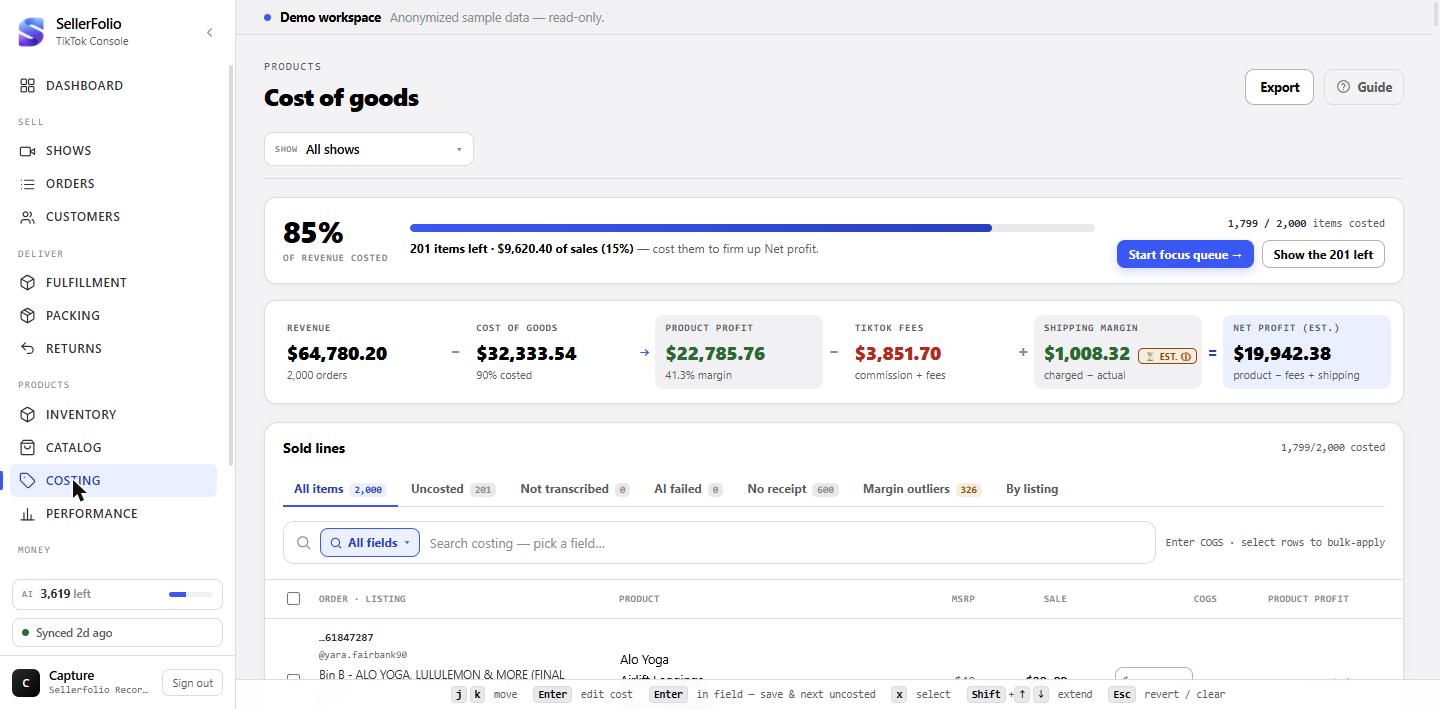
Two bands sit above the table. The first says how much is left; the second says what the costs you have already entered are worth.
The coverage bar
The big percentage is revenue costed, not items costed — it weights each line by what it sold for. That is deliberate: a shop can have most of its items costed and still have most of its money uncosted, and the money version is the one that qualifies a profit figure. Beside it, the item count and the sales at stake say how much work is left in both currencies at once.
Two buttons finish it, and they are genuinely different jobs. Start focus queue walks you through the uncosted lines one at a time with the receipt, the identity and the cost history in front of you. Show the N left just filters the grid to the Uncosted tab — the fast path when you already know these costs by heart and want to type down a column.
The profit strip, read left to right
Revenue − Cost of goods → Product profit − TikTok fees + Shipping margin = Net profit. Each term carries a small caption saying what it is made of.
The arrow between Cost of goods and Product profit is not an equals sign, and the difference is the whole caveat: Revenue is the whole book, while Product profit is computed only over the lines that actually have a cost. Product profit is the goods margin — sale price less COGS, with no fees and no shipping in it — which is why the grid's column of the same name is exact the moment you type a cost and can never exceed 100%.
The table's own header line
Above the tabs, Sold lines carries a plain costed / total count describing the whole filtered book, not just the page you are looking at. It normally comes from the same profit report the coverage card above uses, so the two can never disagree. With a search active it also says how many rows are shown.
When that report has not arrived, the header says so rather than working a number out from the rows on screen. On every load you will see counting costed lines… for a moment. If it stays, or if it reads costed count unavailable, the report is not coming — usually because your sign-in can reach Costing but not Reports. The two wordings are deliberately different: one resolves in a moment, the other never will for you, and the difference is whether to wait or to ask an owner for reports access.
Pick the pile of work
Each tab is a different reason a line needs attention. The counts beside them are uncapped — they describe the whole book in scope, not the 500 rows loaded below. They follow the show picker, and deliberately ignore the search box, so a search narrows the rows without making the badges lie about how much work is left.
The tabs, in the order the work happens
All items and Uncosted are the two views of the costing job itself. Then come the three reasons a line has no identity to cost against, ordered as the pipeline runs: Not transcribed (a video receipt was captured but the AI has not read it yet), AI failed (it tried and could not), and No receipt (there is nothing to read — these are the manual-costing queue). Last, styled as a warning, Margin outliers.
Margin outliers is the odd one out
Every other tab holds missing work. This one holds finished work where the cost is the problem. A mis-keyed digit produces a line that looks completely settled — a cost, a profit, a margin bar — and nothing else on the screen would ever draw your eye back to it. Worse, if that figure is the one you then pick as a product's price in Cost Memory, every suggestion for that product will repeat it.
What counts as implausible is a fact about your business, so the band is yours: set the floor and ceiling in Admin → Settings → Costing. The full rule is in the reference.
By listing, when you hold stock
This tab appears only once the workspace has at least one purchase bin recorded, and it ranks TikTok listings by how many uncosted lines each still carries. It is the doorway to costing a whole listing from a purchase you already entered — Part 7. A shop that never records a bin never sees the tab.
Search narrows whichever tab you are on
The search box is field-scoped: pick a field, type a value, and terms stack — every term must match. You can search the buyer, order ID, TikTok product name, seller SKU, tracking number, buyer location, and the AI's own fields (brand, item, colour, size, MSRP). SKU matches exactly, so "84" will not pull "184"; everything else is a substring.
Cost a line
Three ways in, all writing the same thing: a unit cost against one sold line.
Type into the COGS box
Click the cost cell and type. The box commits when it loses focus or when you press Enter, and the rules are the same everywhere a cost box appears on this screen:
- A number saves. It is rounded to the cent, the way the stored column is.
- An explicit 0 is a real cost, not a blank — use it when something genuinely cost you nothing.
- Emptying the box clears an existing cost and returns the line to uncosted.
- Anything that is not a number reverts to the saved value and says Not a number — reverted, rather than sitting in the cell looking entered.
- Esc peels back one layer at a time: the suggestions list first, then an unsaved edit.
A save is confirmed by a ✓ beside the box. The Product profit column fills in immediately — it does not wait for the server, because it is only sale price minus cost.
Previous costs, offered as you focus the box
Focusing a cost box loads what this product has cost before and lists it under Previous costs — up to five distinct amounts, each with how many times it was used and how long ago. Click one to apply it.
The list is ranked most-used first, not most-recent. That ordering is the point: ninety-five buys at one price describe what a product costs far better than the two most recent entries at another, and picking by recency is exactly how a pair of mis-entries gets mistaken for the truth.
The keyboard, which is the fast way
The grid carries its own cursor, independent of where the browser's focus is. The legend at the bottom of the screen lists the whole vocabulary:
- j / k (or ↓ / ↑) move the cursor. They stop at the ends rather than wrapping — losing your place on a 500-row page with no visible reason for it is worse than a keystroke doing nothing.
- Enter on a row drops into that row's cost box.
- Enter inside the box saves and jumps to the next row that still needs a cost. This is the rhythm the screen is built around: type, Enter, type, Enter.
- x ticks the row; Shift + ↑ / ↓ extends a range from wherever the selection started.
- Esc clears the selection — but only when nothing more local wants it.
The focus queue, for costs you do not know by heart
Start focus queue opens one line at a time in a drawer holding everything needed to price it: what TikTok sold, the AI's reading of the video receipt, the identity fields, this product's previous costs, and the line's own money. The cost box is focused on open, so the loop is type-a-number, Enter, next, without the hand reaching the mouse.
Save & next steps forward; Skip for now steps forward too, and the skipped line comes back around on the wrap rather than being lost. A progress meter in the header counts how many of the queue are done.
What the row chips are telling you
Beside the order id: rec means a video receipt was captured, no receipt means identity and cost have to be entered by hand, settled means TikTok has finalised that order's money, and returned means a completed return has reversed this line — its cost is excluded from the book totals and the Product profit column simply reads returned.
Identity — what the thing actually was
The Product column is the AI's reading of the item, and the Order column is TikTok's. Keeping them apart is deliberate: one is an inference about the goods, the other is a fact about the sale.
Brand, item, colour · size — all click-to-edit
Every line in the Product cell is editable in place. Brand and item offer suggestions from what you have already used, and the item suggestions are scoped to that row's own brand so they never cross brands.
✦ identify runs the AI over the video receipt
Where a receipt was captured, ✦ identify queues it for transcription and the row lights up as the run completes — the grid polls while anything is in flight. Where the AI already tried and failed, the button reads ⚠ retry. Where no receipt was captured at all, the button is disabled and says so, rather than queueing a run that would come back empty a round trip later.
Why identity is worth the keystrokes
Identity is not decoration. It is the key Cost Memory and your cost rules use, and it is the only stable product key available — TikTok's seller SKUs get recycled, and on many books the listing title is a generic phrase repeated across hundreds of different garments. A named brand and item is what lets a price you set once in Cost Memory be suggested for the same product on every later sale.
Your price book — Cost Memory
Cost Memory (in the menu under Costing) is a price book you control: you set what each product costs you, and the app suggests that price for its sales. It never decides a price for you from history.
Set a price per product, and group the AI's names for it
Cost Memory lists every brand + item the AI has read off your sales — one row per product you have set up, and one row per name nobody has set up yet. Open a row to see what that product has actually been costed at before, grouped by amount and by how it got there (typed, suggested, bin, …). Pick one of those amounts or type your own, and Set price.
The AI often spells one product several ways. The product's drawer lists names that look like wording variants of it — tick the ones that really are the same thing and Merge. Nothing is ever grouped for you, and a bundle or set is never offered as a variant of a single item.
Suggestions, and the optional Auto-cost
An uncosted sale of a priced product shows that price as a suggestion in the grid, one click to accept. When one of your cost rules also matches the sale, the rule's bin pick is the suggestion and the price book's price sits beside it as the alternative — the bin plan comes first. A product with no price suggests nothing.
Auto-cost is a per-product switch, off until you turn it on, and only available once the product has a price. When it is on, each sync costs that product's uncosted sales at your price — including the ones already waiting, which is why the switch tells you how many that is and asks for a second click when there are any. It never overwrites a cost, and it never costs a sale a bin rule matches. Those costs carry the auto chip; clearing the price switches Auto-cost off again.
Re-price sales — reviewed, and undoable
Re-price sales… on a priced product lists its sales whose cost differs from your price, for you to review before anything changes. Typed and suggested costs are ticked by default; untick anything that looks wrong. Sales costed from a purchase bin are excluded unless you switch on Include bin sales — including one puts its unit back in the bin before re-pricing it. Consignment-deal sales are listed but never changed.
Confirm writes your price onto exactly the ticked sales, up to 500 at a time. A sale whose cost changed since the list loaded is skipped and reported, and if the product's price itself changed in the meantime nothing is written — reopen and review again. Undo restores every previous amount and re-links each bin sale to its bin (a sale whose bin has since gone is skipped, and the receipt says so).
Working in bulk
Tick some rows and a toolbar appears above the table. Everything on it acts on the selection.
Set a cost across the selection
COGS · Set offers two bases. $ writes the same flat amount to every selected line. % writes a percentage of MSRP — and MSRP here means the retail price the AI read off the video receipt, not the price the item sold for. A line whose order has no readable MSRP is skipped, and the confirmation says how many were: “Updated N items · M skipped (no MSRP)”.
Because the MSRP was transcribed from speech or from a label, it is read leniently: the first
number wins, so $80, 80.00 and $80-100 all mean 80, and
comma-grouped thousands are joined so $1,200 means 1200 rather than 1.
Clear in the same popover removes the cost from every selected line. And an empty box is not zero: pressing Enter on a blank field is refused rather than writing $0.00 across the selection.
The other bulk actions
Brand · Set applies one brand to the selected lines' orders — the same upsert as the per-row edit, so it creates identities where none exist, and reports any costs that landed from history as a result.
✦ Transcribe queues the AI. Its label counts orders, not lines, because transcription is per order and per order is the unit of AI spend: twelve selected lines from three orders is three runs. It appears only if your role may spend AI. ↻ Refresh re-pulls those orders from TikTok.
Selecting more than the page you can see
The header checkbox ticks the rows currently loaded. When the filter matches more than that, the toolbar offers Select all N matching — one more click, and from then on every button on the bar acts on the whole filtered set rather than the page. The toolbar says which of the two you are in: “500 selected on this page” or “1,240 selected · all matching”. Just this page takes you back, and so does ticking any individual row, because at that point you have started choosing.
Because this is much the largest write on the screen, it asks first. The confirmation names the exact number of lines and the sales they cover, and it is the server's count of the set it is about to write, not an estimate from the page. It also names anything that makes the write differ from "everything you can see":
- returned lines are left out, because a returned item must not acquire a cost;
- lines whose cost came from a purchase bin are counted for you, because writing over them drops that bin link and the stock movement with it;
- if the filter matches more than one action can safely take at once, it says so rather than costing what fits and staying quiet about the rest.
Undo, on the line above the table
Every cost write is one addressable action, whether it touched one line or three thousand — typing into a COGS box is an action of one. The line above the table names the most recent one and offers Undo: “Set $12.50 on 340 lines · 2 min ago · Undo”. Only the most recent is offered; older ones are history, not controls.
Undo puts back the amount and where it came from, so a cost that had been applied from a bin comes back labelled that way rather than quietly relabelled as hand-typed. It is deliberately cautious in one direction: any line you have edited since is left alone, and it tells you how many it left.
Grouped, when the decisions are per product
On Uncosted, the Lines | Grouped switch beside the tabs folds the backlog into one row per listing, so you make a decision per product instead of one per line. A listing that sold exactly one product carries a single cost box covering every uncosted line on it, with the cost you have usually paid for that item offered beside it.
A listing that sold several products carries no box at all. It says how many, and expands into them so you can cost each separately. This is deliberate: on a bin or a price-point listing, one number across everything that sold under it would be wrong for almost all of it, and it would be wrong invisibly.
Every listing without a box still carries Cost these in the grid →. That takes you back to Lines with the grid narrowed to that one listing — a bar across the top names it, and Show all listings clears it. From there the normal select all matching flow applies, confirmation and all.
Export
The Export button in the header writes an .xlsx of every row matching the current show, tab and search — not just the page on screen. Each row carries the order and listing, the full AI identity, the sale price, the COGS and where that cost came from, the fee/shipping/payout shares, product profit, net profit and margin.
Cost a whole listing from a purchase bin
When you bought a batch and recorded it in Inventory, you do not have to type its cost line by line. This is the largest cost write on the screen, so it says what it is about to do first.
Three ways in
From the By listing tab, from Cost from a bin… inside a line drawer, or from ▦ Cost N from a bin on the bulk toolbar. The three differ only in scope, and the drawer states which one is in play — "38 selected lines" and "469 lines on this listing" are the same drawer with very different consequences.
FIFO or weighted average, and the override
Bins are consumed either FIFO — oldest bin first, each line taking that bin's unit cost — or at a weighted average across the bound bins. The drawer previews how many lines will be costed before you commit.
Costs worth a second look
Nothing here ever blocks a save or changes a figure for you. The number you entered is kept exactly as entered; you are simply told what it disagrees with.
The “!” chip beside a cost
It appears on any tab, for any saved cost, however that cost got there — not only while a warning from your own keystroke is still on screen. Hovering names the verdict; clicking opens the line. There are four, in order of how specific a claim each makes:
- Not what this usually costs — the cost is more than 20% away from what this exact product has historically cost, and the message names the usual figure.
- Sold below cost — this line loses money. Check the cost, or the sale price.
- This margin looks too good — above the ceiling of your band. Usually a missing digit in the cost, or a cost of zero.
- Very little margin — below the floor. Usually a real cost against a discounted sale.
When the flag stays quiet on purpose
If a line's cost is simply what that listing always costs, no margin flag is raised however good or bad the margin looks. Direct evidence outranks a generic band: one listing on this book carries a single cost across 153 lines whose sale prices range widely, and calling that a missing digit was the band overriding the very history that disproves it. A fixed-price returns bin is a business model, not a typo.
Cost history, at the bottom of the drawer
An append-only trail of every set, change and clear on that line's cost, each entry naming the old and new amounts, the mechanism, who did it and when. This is where the question "who put this number here" is actually answered. A cost written by the price book names it: Price book: <brand> · <product>.
Something looks wrong
A tab count does not match the rows I can see
The counts are uncapped and describe the whole book in scope; the grid loads 500 rows at a time. Page through with the controls under the table — the range there describes the matches, including your search.
The tab counts do not add up to All items
They are not meant to. The tabs overlap by design — see the bucket table for exactly which ones and why.
Margin outliers is flagging a third of my costed lines
Then the band is wrong for your business, not the data. The built-in 10–65% band assumes a book with few below-cost sales, and clearance-heavy live selling routinely breaks that assumption — genuine below-cost lines are ordinary, not errors. Widen the floor in Admin → Settings → Costing; setting it well negative turns below-cost lines back into information rather than a queue.
A line shows no fees, shipping or payout at all
TikTok has not sent that order's figures yet. This is not the same as unsettled — on the live book 281 of 294 unsettled orders already carried all three, and the ones that did not were minutes old. They usually arrive within a few hours of the order being placed. Product profit is unaffected either way: it is sale price less COGS and needs nothing from TikTok.
A cost I entered came back different
Check the line's Cost history. A bind with the override armed, or a bulk write, can replace a hand-typed cost — both are recorded there with the actor and the time. So can a price-book re-price, but only one you confirmed. Auto-cost cannot: it only ever fills an empty cost.
Money shows as dashes
Costing needs permission to read costing; seeing money needs a second permission. Without it amounts are masked, and the previous-costs list will be empty rather than showing figures it cannot display.
What every state means
The definitions the screen actually uses, in the screen's own vocabulary.
Cost states
Every line is in exactly one of these. The middle five are all "costed" — they differ only in how the cost got there, which is the first thing to know when a number looks wrong.
| State | Shown as | What it means |
|---|---|---|
| Uncosted | empty box; uncosted in the Product profit column | No cost recorded. Contributes revenue and no cost, so it holds profit down and makes the reported result read high. |
MANUAL | a plain figure | A person typed it — in the grid, in the drawer, or through a bulk write. The only state that represents a decision someone made about this line. |
SUGGESTED | auto chip | Written automatically with nobody confirming it — today by a product's Auto-cost in Cost Memory (its cost history names the product); older ones by the retired history-based cost memory. Typing over it makes it MANUAL. |
LOT | a plain figure | Written by binding this listing to a purchase bin (Part 7). It is the only source a re-cost of that purchase in Inventory will rewrite — hand-typed and automatic costs are left exactly as they are. |
SKU_CATALOG | a plain figure | Materialised from a stored per-SKU cost, using the version that was in force at the time the order was placed. |
IMPORT | a plain figure | Reserved. Importing costs writes per-SKU catalogue entries, which reach a line as SKU_CATALOG, so no line cost currently carries this source. |
| History unclear | history unclear chip, on an uncosted line | Left by the retired history-based cost memory: it found this product's history self-contradicting and deliberately wrote nothing. A decision is waiting for you. Recorded in the line's cost history as MEMORY_CONFLICT — a non-event, with no amounts on either side. No new ones are created; set the product's price in Cost Memory instead. |
| Returned | returned chip; returned in the Product profit column | A completed return reversed this line. Its cost is excluded from the book totals, and an all-time identity backfill will not cost it. |
The tabs, and exactly what each counts
All counts sit inside the same base scope: this workspace, the shows you have selected, and orders TikTok has not marked cancelled, refunded or unpaid.
| Tab | Counts | Overlaps |
|---|---|---|
| All items | Every sold line in scope. | The superset of everything else. The other tabs do not partition it. |
| Uncosted | Lines with no cost recorded. | Overlaps Not transcribed, AI failed and No receipt freely. Never overlaps Margin outliers. |
| Not transcribed | Lines whose order has a captured video receipt and no transcript at all. | Disjoint from No receipt by construction — the "has a receipt" half is what makes both drainable to zero, and what stops Transcribe being a no-op on rows that can never be read. |
| AI failed | Lines whose order has a transcript in the failed state. | A subset of "has a transcript", so disjoint from Not transcribed. Overlaps Uncosted. |
| No receipt | Lines whose order has no captured video receipt. | These can never be AI-identified — they are the manual-costing queue. |
| Margin outliers | Costed lines whose product margin is outside your band — see below. | Every row already has a cost, so it never overlaps Uncosted. It is a line-level test, not an order-level one: an order can hold one sensible line and one fat-fingered one, and only the second is listed. |
| By listing | TikTok listings that still carry uncosted lines, ranked by how many. | A different view entirely, with its own source and no badge. Visible only once the workspace holds stock. |
The margin-outlier rule
The margin tested is the product margin — (sale − cost) ÷ sale
— the same goods-only figure the Product profit column shows. Deliberately not the
net-of-fees margin: a line can be a perfectly ordinary sale and still net poorly once
TikTok's cut and shipping land. What this looks for is a cost that cannot be right, not an
order that did badly.
| Rule | Default | Detail |
|---|---|---|
| Floor | 10% product margin | Below this, the cost is suspiciously high for what the line sold for. Configurable in Admin → Settings → Costing, down to a very negative value if you would rather below-cost lines were information than a queue. |
| Ceiling | 65% product margin | Above this, the cost is suspiciously low — the usual signature of a missing digit or a cost of zero. Configurable in the same place. |
| Uncosted lines | never flagged | Not an outlier — a different tab. |
| Zero-price sales | never flagged | A giveaway or a fully-discounted bundle line has no meaningful margin, so it is excluded rather than counted as a 0% outlier. |
| The product-norm exemption | 3 costed lines | Once a TikTok listing has at least three costed lines, its most common cost counts as what that product costs. A line sitting exactly on that figure is never flagged, whatever margin it implies. The band is a fallback for lines with no history — never an override of direct evidence. The norm is keyed on the listing title, so renaming a listing on TikTok starts its norm again from zero. |
| Drift (the “!” on a fresh save) | 20% | A separate, more specific check: the cost you just entered against what this exact product has usually cost, where "usually" is the amount used most often. Silent when the only history is brand-wide, and silent when the difference is inside the quiet band — a warning that fires on ordinary supplier variation is one nobody reads. |
How Cost Memory decides
| Rule | Value | Detail |
|---|---|---|
| Key | brand + item | A sale belongs to a product when its AI brand and item is one of that product's names. Single-item orders only — a price means nothing against one line of a multi-item order. |
| Price | set by you | Nothing is suggested for a product with no price. Its most common past cost is shown as a hint on the Cost Memory row only — never applied. |
| Names | one product each | A name belongs to at most one product. Variants are suggested for merging, never merged for you; bundles and sets are never suggested into a single item. |
| Priority | bin rule first | When a cost rule matches the sale, its bin pick is the suggestion and the price book is the alternative beside it. Otherwise the price is the suggestion. |
| Auto-cost | off by default | Per product, only with a price. Costs uncosted sales on each sync, including those already waiting; never overwrites; never a sale a bin rule matches. Clearing the price switches it off. |
| Re-price | reviewed, 500 per Confirm | Only sales you tick. Bin sales excluded unless included (then unlinked from the bin); consignment-deal sales never touched. One Undo per Confirm. |
| Price change | future only | Setting, changing or clearing a price never touches a sale already costed. |
What this screen cannot see
Honest gaps, so a figure here is not asked to answer a question it cannot.
| Gap | Consequence |
|---|---|
| No date window | Only a show filter. The coverage bar and profit strip describe every synced order in scope, not a period. Finance is the screen with the clocks. |
| Quantity | TikTok sends one row per unit, so a line item carries no quantity. That is why a doubled cost can only be labelled as a possible per-line bundle, never detected. |
| MSRP is the AI's reading | The MSRP column is the retail price transcribed from the video receipt, not a TikTok field. "% of MSRP" is computed from it, and a line without a readable one is skipped. |
| Product profit excludes fees and shipping | It is sale price less COGS. TikTok's cut and the shipping economics are separate terms in the strip and separate rows in the drawer. |
| Unbilled shipping | Until TikTok bills a label, that order is excluded from shipping margin rather than assumed free — so the buyer-paid shipping on it is known revenue that is not yet margin, and net profit is marked estimated. |
| Landed-cost allocation lives in Inventory | Costs on this screen come from typing, from a Cost Memory price, or from binding a purchase bin. Spreading a bin's landed costs — freight, duties, prep, as many rows as the buy needs — across its lots, and re-costing when those figures change, happens on the purchase, not here. |
| Cancelled, refunded and unpaid orders | Never appear anywhere on this screen, in any tab or count. |
| Returned lines | Shown, but their cost is reversed out of the book totals, and bulk identity backfills skip them. |
| The drift check on rows you never touched | It runs against history loaded when you focus a cost box, so a row nobody focused is not drift-checked. The Margin outliers tab is the sweep that does cover everything. |
Habits worth keeping
Cost the show while you still remember it
Scope to the show you just ran and work the Uncosted tab down. The identities are fresh and the receipts are recent. For a product you sell again and again, set its price once in Cost Memory and the next show's sales arrive with the suggestion ready.
Type over the “auto” costs on anything that matters
An automatic cost is a figure nobody has looked at, not a decision. On your highest-volume products it is worth checking the price in Cost Memory deliberately — a wrong price there is what an Auto-cost product repeats on every sale.
Name the item, not just the brand
Brand alone gives you a brand-wide pool that can neither price a product nor support a drift warning. Brand plus item is what turns cost history into something that works for you.
Set the outlier band once, honestly
A band that flags a third of your lines is a band nobody reads, and then it is not there for the mis-keyed digit it was built for. Widen the floor until below-cost stops being a queue, and leave the ceiling tight — the high side is where the real data errors live.
Check coverage before quoting a profit figure
The coverage bar is the honest caveat on everything below it. Quoting a result from a half-costed book is how a good month turns into a bad surprise.