Five questions, one per tab:
- Overview — does the money reconcile, and where did it go? (Part 1–3)
- Profitability — what did the period actually earn, and how much of it is certain? (Part 4)
- Settlements — the order-by-order records behind the totals. (Part 5)
- Cash — what is committed, what has landed, what is held back. (Part 6)
- Costs & drivers — every fee and shipping component TikTok posted. (Part 7)
A data dictionary at the end maps every name on the screen to the TikTok field it comes from, in TikTok's own words.
The same dollar can be dated three ways, and Finance uses all three because each answers a different question:
- Order date — when the order was placed. Drives Overview and Profitability.
- Statement date — when TikTok posted the record. Drives Costs & drivers and every component breakdown.
- Payment date — when money reached your bank. Drives Cash.
This is why a breakdown can be smaller than the figure above it: some of the window's orders have not been posted yet. Where that happens the gap is shown as its own line rather than left for you to find.
Read the top of the screen
Two things sit above the tabs and never change as you move between them.
The reconciliation line
The first line tells you whether your books agree with TikTok's. Reconciled means our arithmetic and TikTok's posted settlement legs match across every settled order in the window. That is the normal state, and it is deliberately quiet — one line, one dot.
Orders TikTok has not settled yet are held separately, and the line names them. Their figures are TikTok's own estimate rather than posted legs, and an estimate does not tie the way a settled order does — so it is reported beside the verdict instead of counting against it. Expect that number to be largest right after a show, while a batch of fresh orders is still working through; it resolves itself as the legs post.
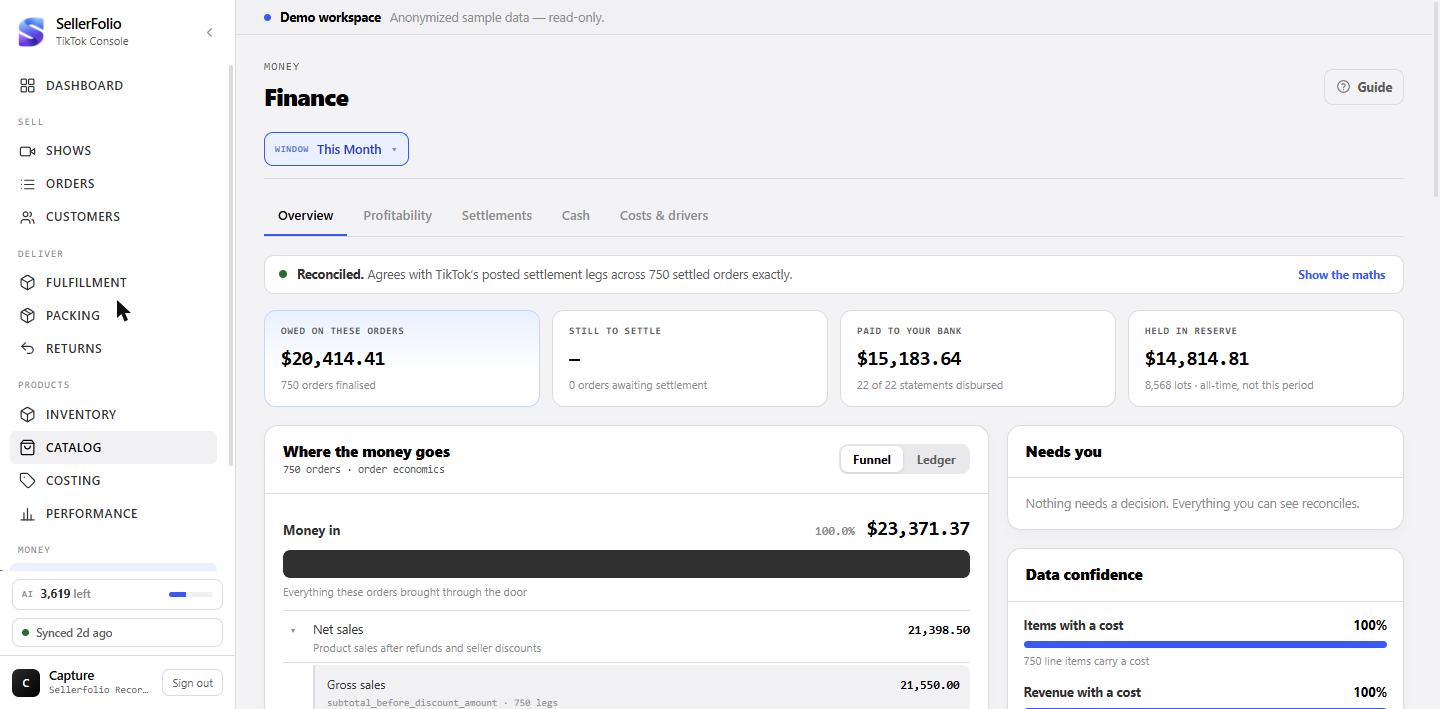
The four status cards
Owed on these orders is what TikTok owes for orders placed in this window. Still to settle is the part it has not finalised yet. Paid to your bank is money that actually arrived — a different clock, so it will not equal the first card. Held in reserve is a live, all-time balance and ignores your date filter, which the card says on its face.
Show the maths, when you want the proof
The reconciliation line hides its arithmetic until you ask. Show the maths spells out net sales, plus buyer-paid shipping, less fees, less what TikTok kept for labels — ending at the settlement total TikTok posted.
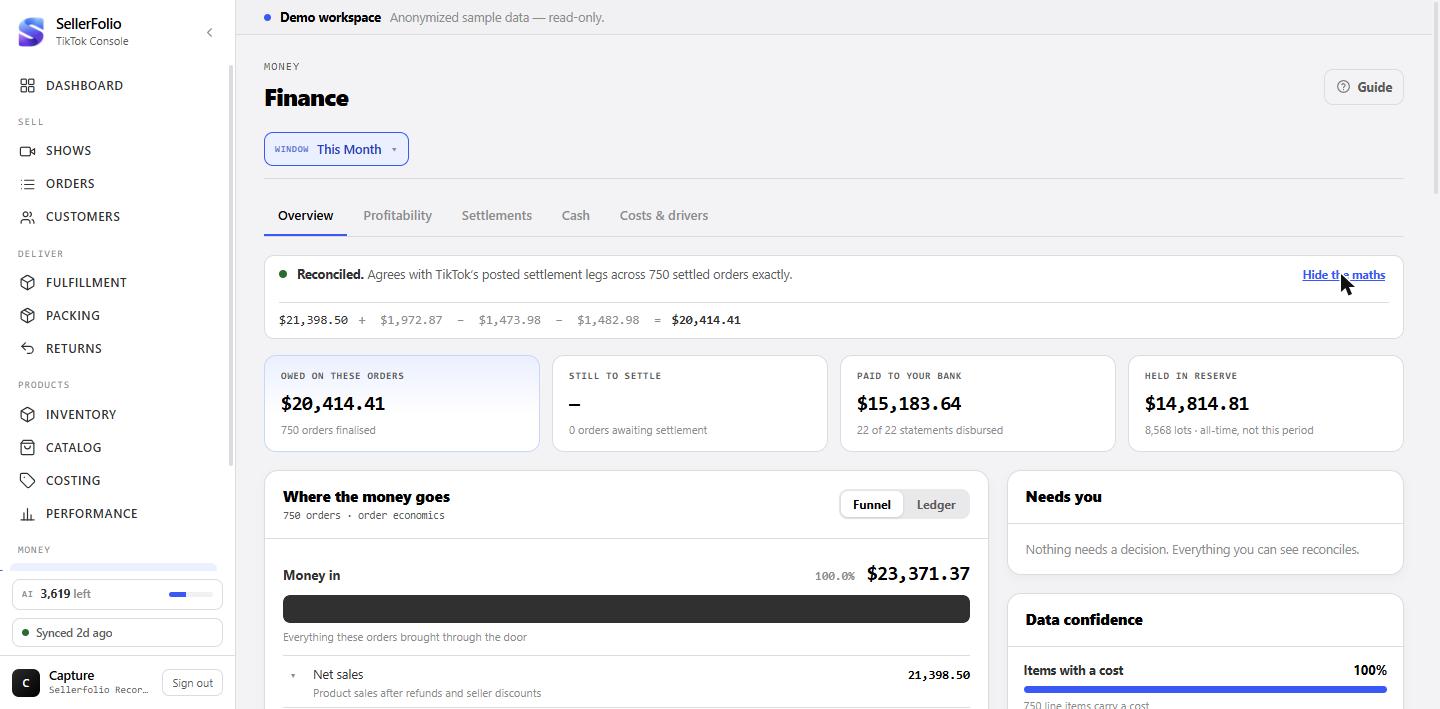
Follow where the money went
The main card answers one question: of everything buyers paid, how much did you keep? It has two views of the same figures.
The funnel view
Each bar is what is left at that stage, and each bar is a share of the first one. The space a bar gives up is the money that left between them. Read it top to bottom: Money in is everything buyers paid — product and shipping. TikTok owed you is what survives fees and label costs. After merchandise takes off what the goods cost. You kept is the result once operating costs land.
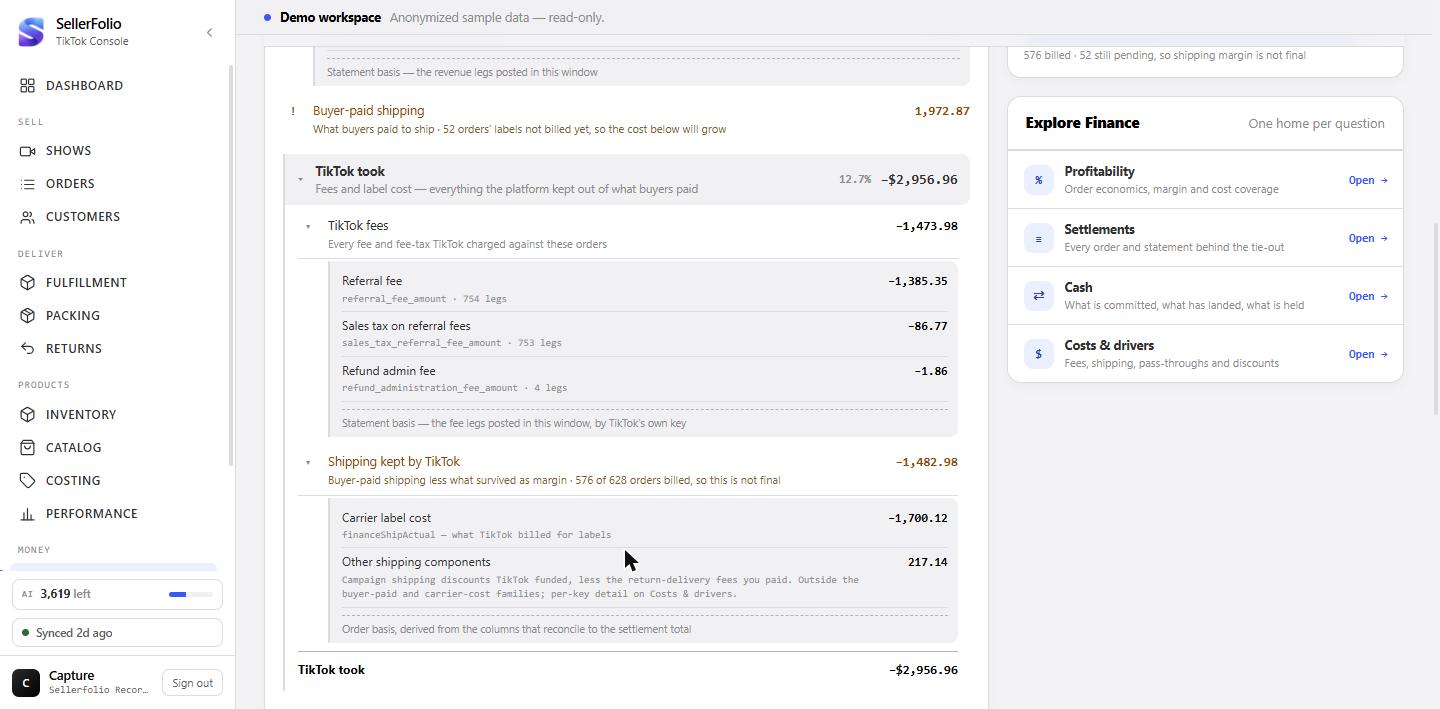
Open any row to see what it is made of
Nothing is a lump. Net sales opens to gross sales, refunds and seller discounts. TikTok fees opens to the referral fee, the sales tax on it and the refund admin fee — TikTok's own field names are printed under each label so you can match them against a statement. Operating expenses open to your own categories, and platform adjustments to TikTok's posting types.
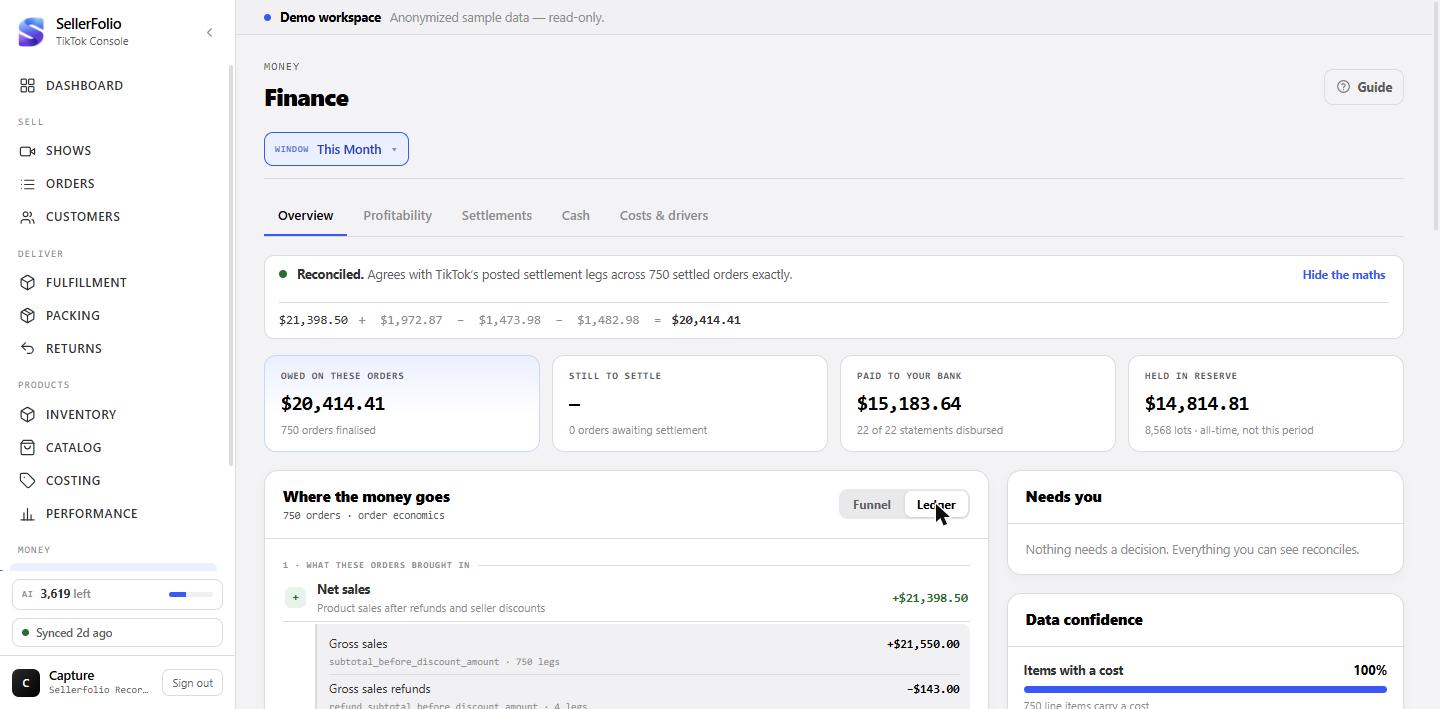
The ledger view, when you want every line at once
Ledger shows the same figures as a running statement: a sign against every row, stage headings, and a subtotal closing each stage. Use the funnel to see proportions, and the ledger to check line by line.
Use the right-hand rail
Three cards that tell you what to do next and how much to trust what you are reading.
Needs you
Anything wanting a decision, and nothing else. Uncosted lines, statements still processing, orders with no settlement estimate, a reconciliation gap past tolerance. Each row goes straight to the tab that fixes it. An empty card is a real answer — it means nothing needs you.
Data confidence
How complete the numbers above actually are. Items with a cost counts line items; Revenue with a cost weights by money and is the one that qualifies the result — a shop can have most items costed and still have most revenue uncosted. Shipping labels billed tells you how final the shipping figures are: until a label bills, its cost is not in the numbers.
Explore Finance
A plain list of the other four tabs and the question each answers. If a tab is greyed out, your role does not have the permission it needs — the card says which one.
Profitability
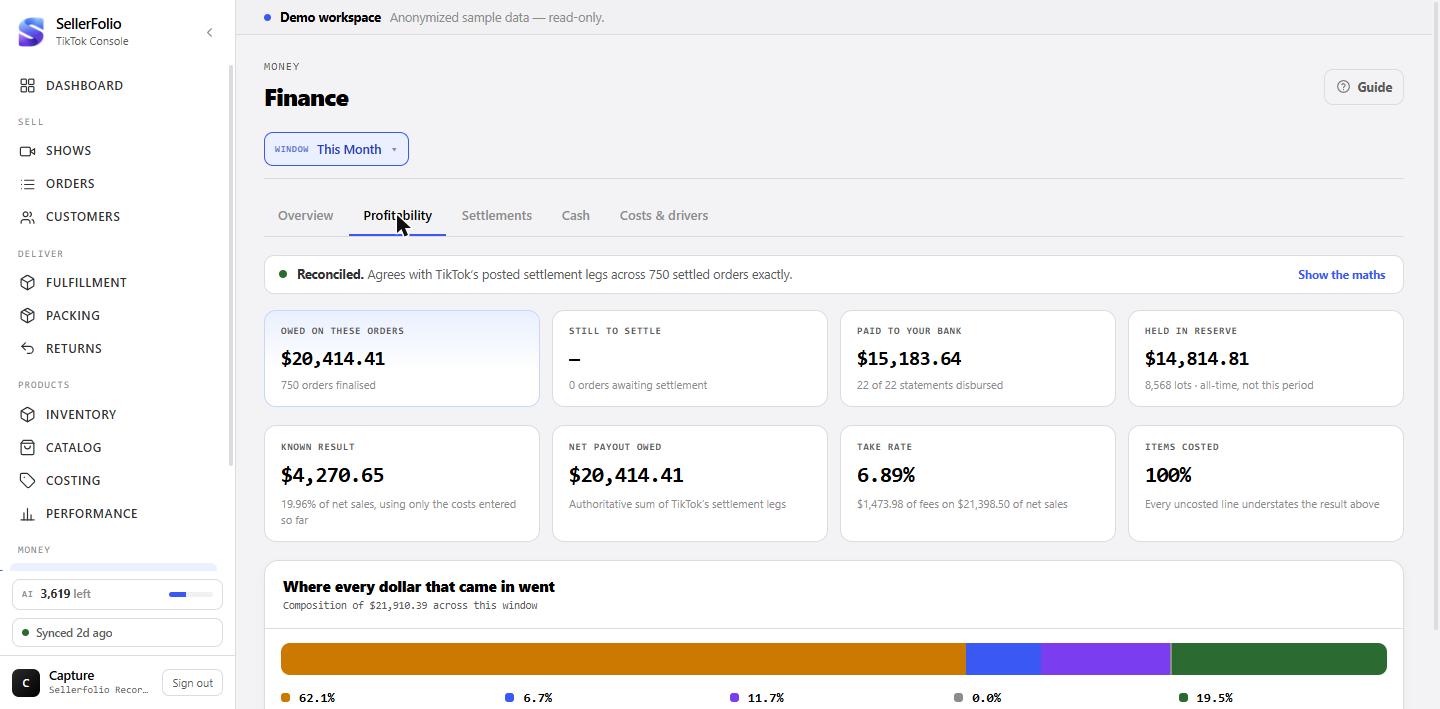
What the period earned, and where each dollar went.
The four figures
Known result uses only the costs entered so far. Net payout owed is the settlement total. Take rate is TikTok's fees as a share of net sales — the number to watch month over month. Items costed is the caveat on the first figure.
The composition bar
One bar, split by what claimed the money. On most books merchandise dwarfs fees — which is worth knowing before spending an afternoon arguing with a platform about commission. The percentages are shares of the same total the caption names.
Settlements
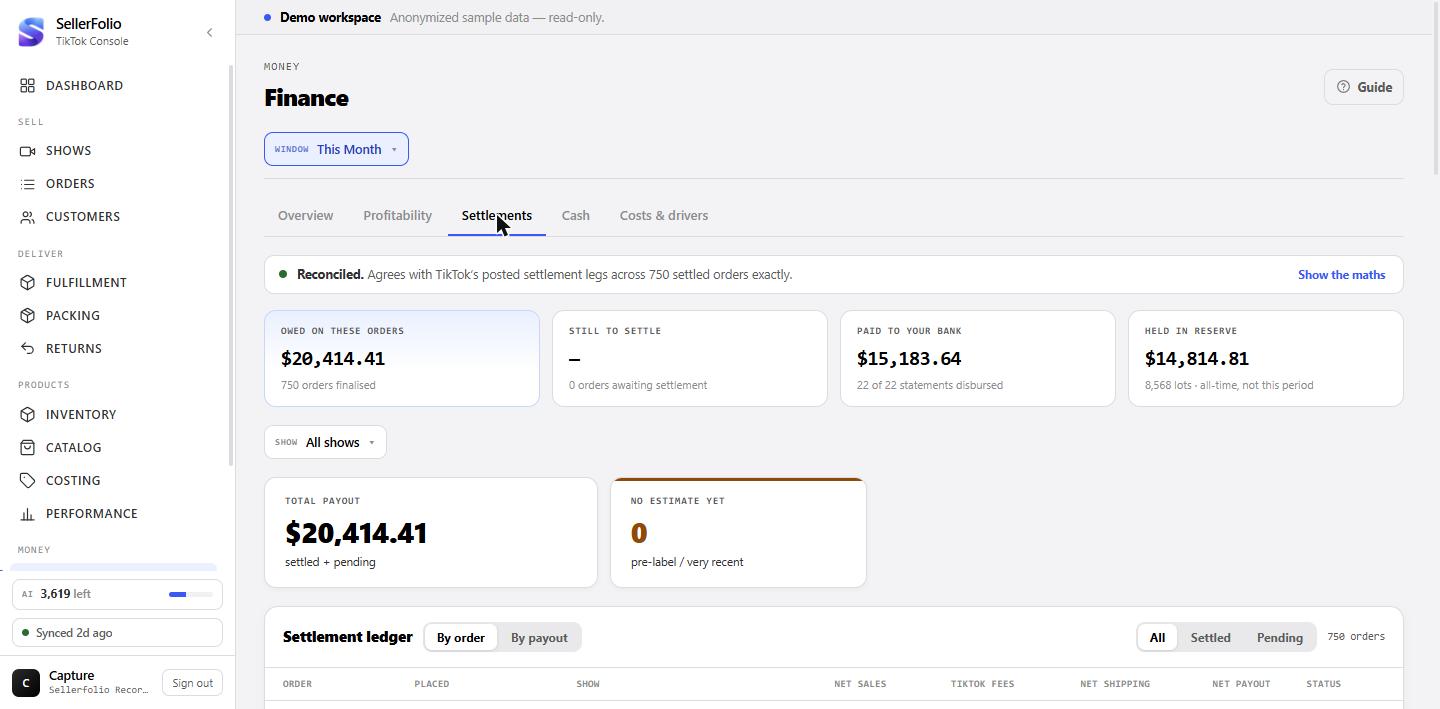
The records behind every total on Overview.
Order by order, or payout by payout
By order lists each order with its net sales, fees, shipping and payout. By payout groups the same money into the statements TikTok issued. Filter to Settled or Pending to see which side of the line an order is on, and use the show filter to read one broadcast at a time.
Cash
Money that has moved, and money you have already committed.
Committed cash, looking forward
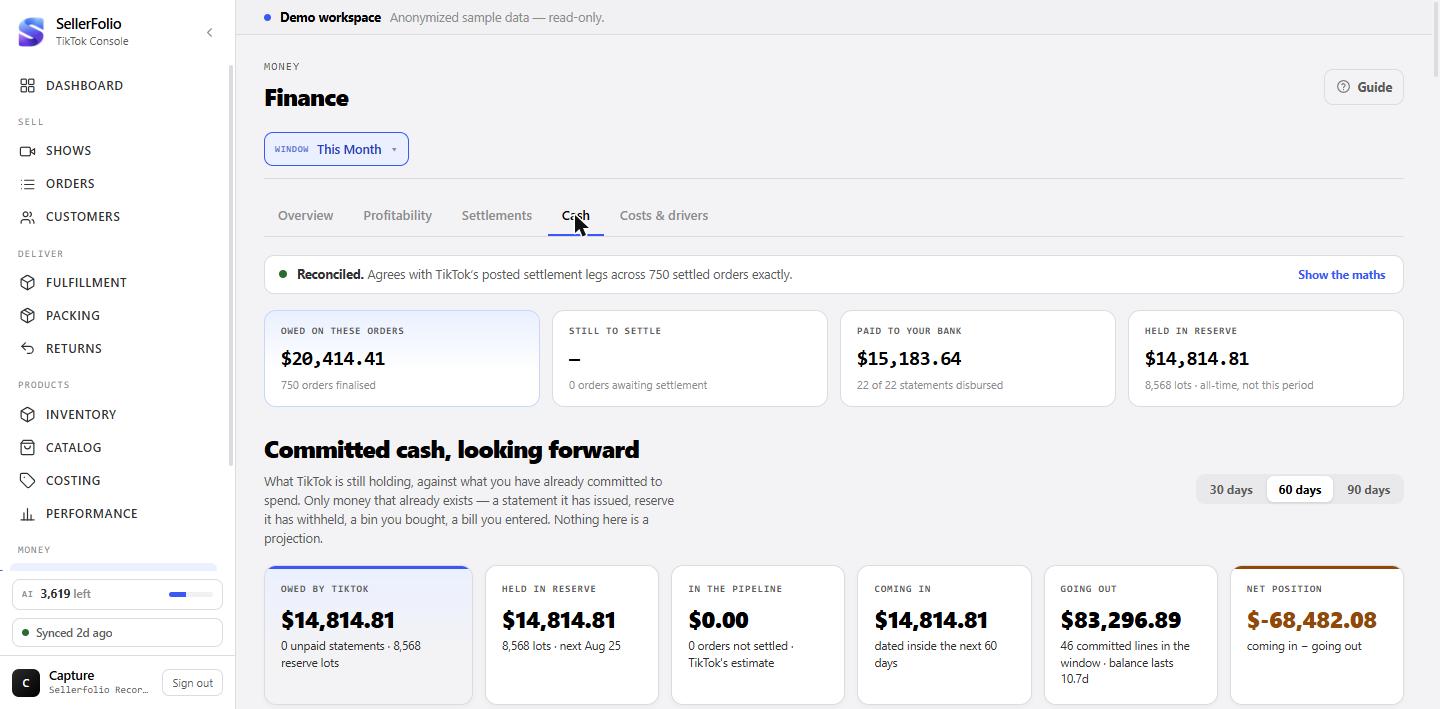
The top of the tab is the only forward-looking view in Finance, and it is deliberately not a forecast: every line already exists as an issued statement, reserve TikTok has withheld, a bin you bought or a bill you entered.
Owed by TikTok is everything the platform has recognised and not handed over — statements it has issued but not paid, plus held in reserve. Reserve is the part sellers usually miss: TikTok withholds it from a statement it then pays in full, so a shop whose statements have all settled can still be owed a great deal. Each row in the list below is one expected release day.
In the pipeline is TikTok's own quote on orders that have not settled. It is an estimate, so it sits beside the balance rather than inside it, and it has no rows — the feed carries no settlement date to put them on. Owed by TikTok against Going out gives a net position, and Going out also reports how long that balance lasts at your current burn.
Below it: what has already happened
Cash flow by week, the reserve release forecast, the payout timeline, settlement health and any penalties. Reserve is the one most people have not met: TikTok holds a slice of each payout for a period and releases it later, which is why paid-to-bank runs behind owed-on-orders.
Costs & drivers
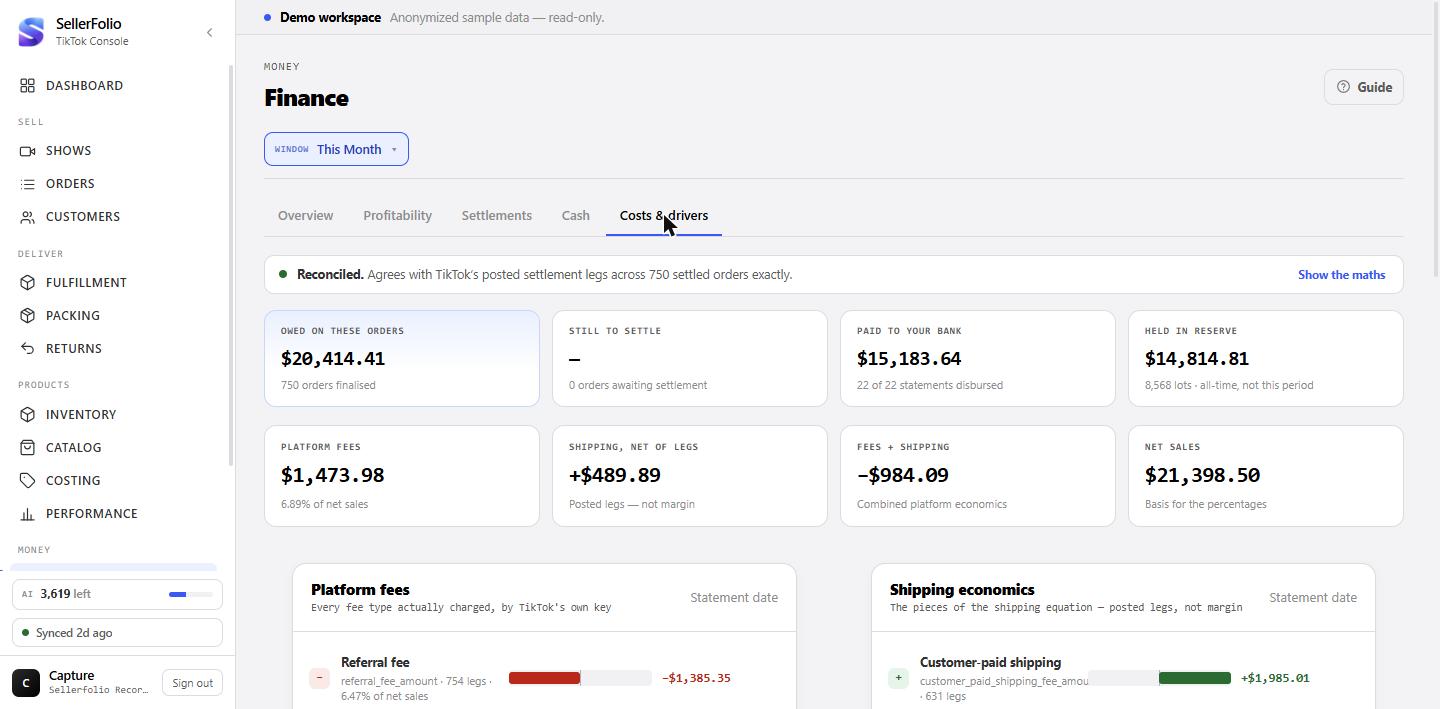
Every component TikTok posted, by its own field name.
Read the diverging bars
Each bar runs from a centre line: money out to the left in red, money in to the right in green. Fees all fall one way, which is the point. Shipping genuinely goes both ways — buyers pay it, carriers charge it, and TikTok sometimes discounts it — so the centre line makes the mix legible at a glance.
The four cards
Platform fees is every fee type charged. Shipping economics is the pieces of the shipping equation — posted legs, not margin. Never your money is sales tax and regulatory fees TikTok collects and remits, which should net to about zero. Other movements is whatever else the window carried.
Something looks wrong
A breakdown does not add up to the row above it
Look for a Not yet posted in this window line. Components are dated to when TikTok posted them and their parent to when the order was placed, so a window's legs can be incomplete. That line is the difference, and with it the rows do add up.
Profit looks too good
Check Revenue with a cost on Overview. If it is well under 100%, the result is understating cost and overstating profit by construction. Costing is where that is fixed.
Paid to your bank is far below what you are owed
Normal, and usually two causes together: statements take days to pay, and TikTok holds a reserve. Both are on the Cash tab — the payout timeline for the first, the reserve forecast for the second.
Shipping margin keeps changing
Until a label bills, an order's shipping cost is not in the numbers, so margin moves as labels catch up. Shipping labels billed on Overview tells you how far through that the window is.
Data dictionary
What each name on the screen means, and the TikTok field it comes from. The right-hand column is TikTok's own wording from the Finance API — if a figure ever has to be argued about with TikTok, that is the language to argue in. Every component row in Finance prints its raw key underneath the label so you can find it here.
Our terms
Names that are ours, not TikTok's — they describe things we derive.
| Term | What it is |
|---|---|
| Money in | Net sales plus what buyers paid to ship. Revenue only — no cost has been taken off yet. |
| TikTok owed you | The sum of every settlement leg TikTok posted for the window's orders. The authoritative figure; everything else is checked against it. |
| After merchandise | What is left once recorded product cost and in-flight returns come off. |
| You kept / Known result | The result after operating costs. "Known" because it uses only the costs entered so far — uncosted lines make it read high. |
| Shipping kept by TikTok | Buyer-paid shipping less the shipping margin that survived. Derived from the columns that reconcile to the settlement total, not from a single TikTok field. |
| Other shipping components | Shipping money outside the buyer-paid and label-cost families — on this book, campaign shipping discounts less return-delivery fees. |
| Not yet posted in this window | The gap between an order-dated total and the statement-dated legs beneath it. Timing, not a missing figure. |
| Reconciliation plug | Whatever is left over when our arithmetic and TikTok's posted legs disagree. Small is normal; it is the size that matters, not its existence. |
| Take rate | TikTok's fees as a share of net sales. |
| Reserve | Money TikTok holds back from payouts and releases later. All-time, never filtered by your date range. |
Revenue and discounts
| Our label | TikTok field | TikTok's definition |
|---|---|---|
| Gross sales | subtotal_before_discount_amount |
The total price of all order items before any seller discounts and platform discounts are deducted. Equivalent to the shop's gross sales. |
| Gross sales refunds | refund_subtotal_before_discount_amount |
The total price of all refunded items before any seller discounts. Equivalent to the shop's gross sales refund. |
| Seller discounts | seller_discount_amount |
Discounts funded by the seller — promotions, flash deals, bundles, vouchers, and the seller's share of a co-funded voucher. |
| TikTok-funded discounts | platform_discount_amount |
The discounts funded by TikTok Shop, such as coupons and campaign discounts. |
| Customer payments | customer_payment_amount |
The final amount paid by the customer. |
| Customer refunds | customer_refund_amount |
The exact amount refunded to the customer. |
Fees
| Our label | TikTok field | TikTok's definition |
|---|---|---|
| Referral fee | referral_fee_amount |
The referral fee charged for processing successful orders. US only. |
| Sales tax on referral fees | sales_tax_referral_fee_amount |
Some US states treat referral fees as taxable; TikTok collects and remits that sales tax when a taxable fee is charged. |
| Refund admin fee | refund_administration_fee_amount |
The 20% refund administration fee deducted from the total refunded referral fee amount. |
| Transaction fee | transaction_fee_amount |
The transaction fee charged for processing successful orders. Non-refundable, US only. Not present on this book — the field exists in TikTok's API but no leg here carries it. |
Shipping
The most confusing area, because TikTok splits shipping across several fields and rolls subsidies into one parent. These are the ones this book actually carries.
| Our label | TikTok field | TikTok's definition |
|---|---|---|
| Customer-paid shipping | customer_paid_shipping_fee_amount |
The actual shipping fee borne by the customer, calculated from the product weight the seller uploaded. |
| TikTok Shipping label cost | fbm_shipping_cost_amount |
The shipping fee incurred by the seller for using TikTok Shipping. |
| Campaign shipping discount | platform_shipping_fee_discount_amount |
The shipping fee discount provided in accordance with a campaign policy. Part of shipping_fee_discount_amount. |
| Customer shipping refunded | refunded_customer_shipping_fee_amount |
Shipping fee returned to customers due to returns and refunds. Excludes subsidies. |
| Return shipping | return_shipping_fee_amount |
The shipping fee paid by the seller for the delivery of returns. |
promo_shipping_incentive_amount, and the
TikTok Shop Shipping Incentive is referenced by
customer_shipping_fee_offset_amount — different fields, neither of which this
book currently carries. What you see here is the campaign-policy discount.
Taxes and regulatory fees
Collected from buyers and handled by TikTok. These never touch your profit.
| Our label | TikTok field | TikTok's definition |
|---|---|---|
| Sales tax charged to customers | sales_tax_payment_amount |
The expected sales tax to be paid by the customer. US only. |
| Sales tax due, net of refunds | sales_tax_amount |
The final sales tax to be paid by the customer for the product and delivery. Formula: sales_tax_payment_amount − sales_tax_refund_amount. US only. |
| Retail delivery fee | retail_delivery_fee_amount |
The final retail delivery fee for deliveries in Colorado, US. |
sales_tax_amount is the net tax owed after refunds — it is not evidence that
TikTok has paid a state. This guide used to call it "Sales tax remitted", which claimed
more than the API can tell us.
The three clocks, precisely
| Clock | Means | Drives |
|---|---|---|
| Order date | When the buyer placed the order. | Overview, Profitability, the status cards for owed and still-to-settle. |
| Statement date | When TikTok posted the record onto a statement. | Costs & drivers, and every component breakdown. |
| Payment date | When money actually reached your bank. | Cash, and the paid-to-your-bank card. |
A figure on one clock will not equal the same-sounding figure on another, and that is not an error. It is why the breakdowns carry a Not yet posted in this window line rather than silently coming up short.
Habits worth keeping
Read the reconciliation line first
It is one line and it is the only thing on the screen that can tell you the rest is untrustworthy. Green, then carry on.
Check coverage before you quote a profit figure
Revenue with a cost is the honest caveat. Quoting a result from a half-costed window is how a good month turns into a bad surprise.
Watch the take rate, not the fee total
The total rises simply because you sold more. The rate is the one that tells you whether the mix moved against you.
Clear Needs you before month end
Everything in that card makes a number less true. Closing a month with it empty means the figures will still be right when you look back at them.