Six things, and they build on each other:
- Record what you bought — a bin, its total, its unit count (Part 1).
- Read the list — what is on the shelf, what is still coming, what is unpaid and what is waiting on a decision from you (Part 2).
- Attach a bin to a listing, so the sales on it are costed from that stock and the units come off the shelf as they sell (Part 3). This is the part that makes your margins real.
- Split one buy across several products, when one total has to cover things that are not worth the same (Part 4).
- Count what is actually there, and write off what is not (Part 5).
- Fix a cost you typed wrong, after seeing exactly what it will change (Part 6).
Until a bin is attached to a listing, a bin's sell-through stays 0.0% and Last sale reads "never sold" — nothing is drawing it down yet. That is accurate, not a bug, and Part 3 is how you change it.
Record your first buy
A buy is what you paid. A bin is stock that came out of it — a pallet, a case, a tote, a bag of returns. Most buys are one bin, and that is the four-field form below. A buy that splits into several bins is the same form with a bin added.
Open Inventory
It sits in the left menu under Products. With nothing recorded yet, the list is the form — there is no empty screen to get past. Once you have stock, + New buy in the header opens the same form again.
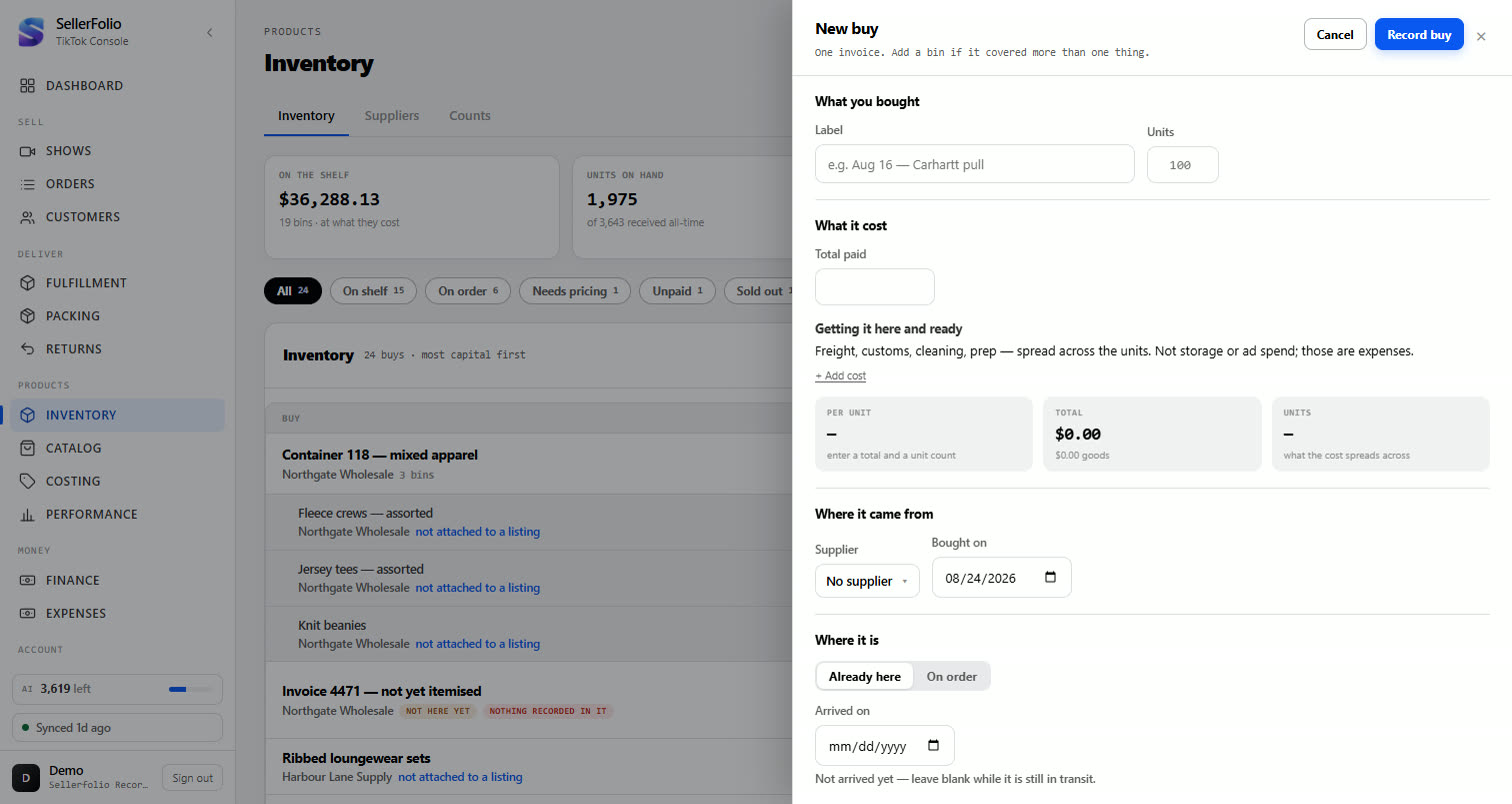
Give it a label, a total and a unit count
Label it however you will recognise it later — Aug 16 — Carhartt pull beats
bin 4 in three weeks' time. Total paid is what left your account.
How many units is how many sellable pieces came out of it.
Click + Add cost if the buy had freight, duties or prep. Enter one amount with a category beside it, drawn from the same list Expenses uses. Landed costs spread across the units along with the goods total, so the per-unit figure includes what it actually cost to get the bin here — not just what the goods themselves were worth.
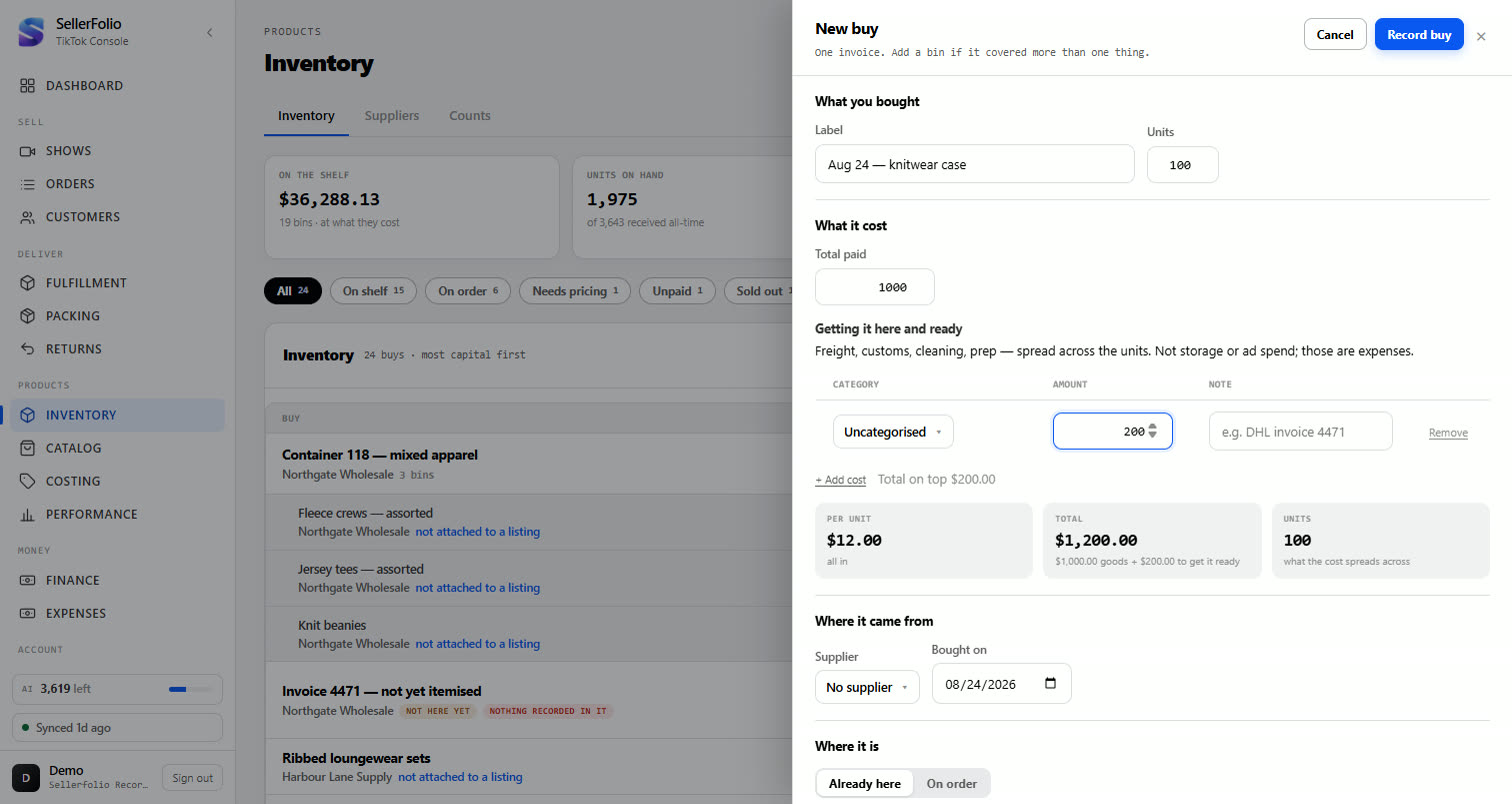
+ Add cost takes as many cost lines as the buy actually had — freight, duties and prep each with their own category and note, not one lumped figure. A bin's own card can add or remove a single row at any time, so a freight invoice that turns up two weeks after the goods can be labelled and still land on the right bin.
Record it
The bin appears in the list with its units on hand and what they are worth.
A bin with no price is legal. Leave Total paid empty and the
bin is still recorded — it just reads needs pricing and carries a
Price it button instead of a value. It does not pretend to be worth
$0.00, because zero is a price and "we do not know yet" is not. Until you price
it, the bin cannot cost anything it sells — so price it before you expect a margin from it.
Read the list
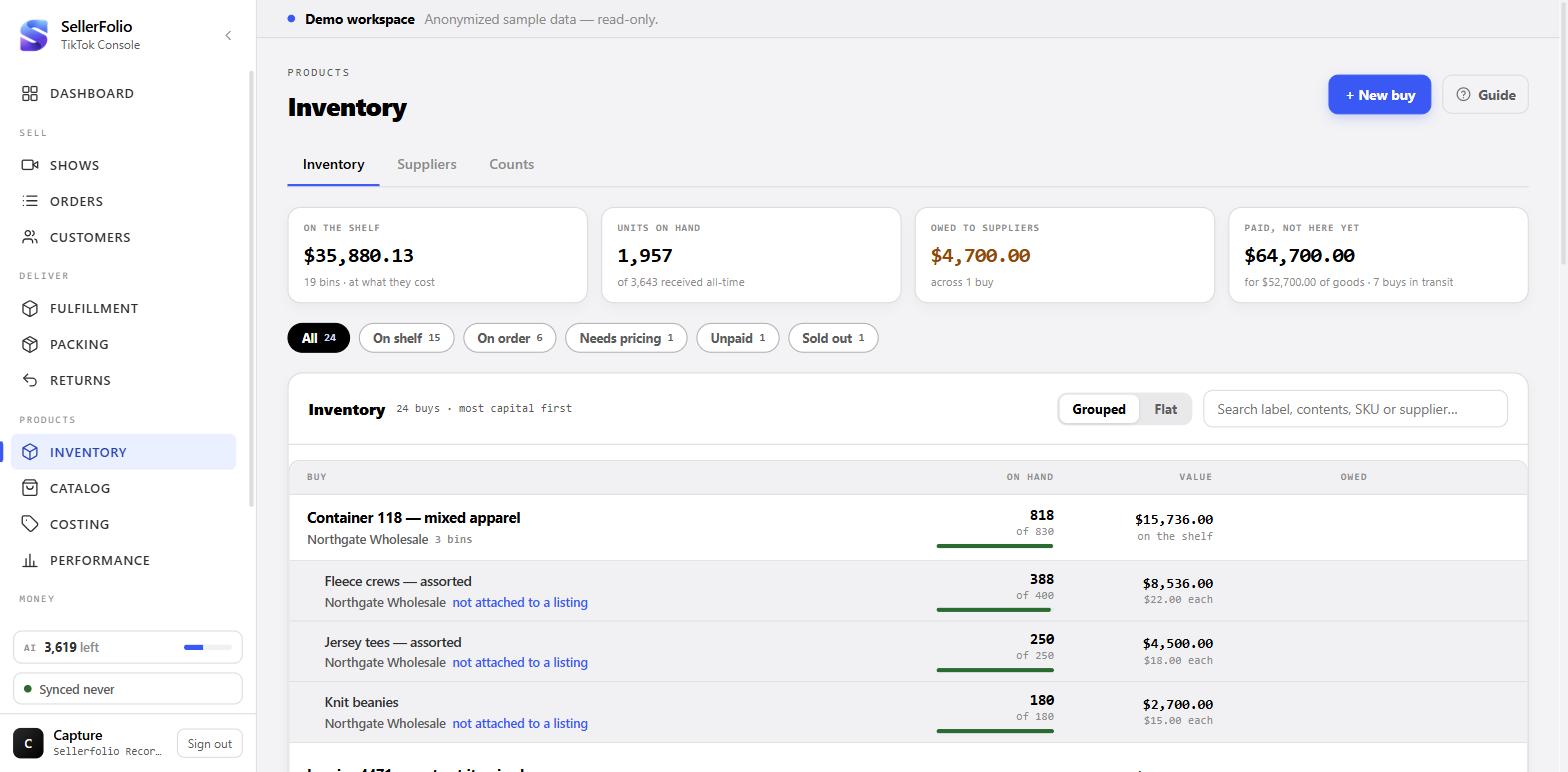
Ranked by capital tied up, because that is the number that changes your next buy.
The four cards at the top
They answer four different questions, and it is worth knowing which is which before you read a number off one.
| Card | What it counts |
|---|---|
| On the shelf | What your stock cost you, for stock you actually have. On-order goods are never in it — money is tied up in both, but only one of them can be sold. |
| Units on hand | Sellable pieces you hold now, against everything ever received. On-order units are excluded here too, for the same reason. |
| Owed to suppliers | What is still unpaid, and across how many buys. Zero here means every buy is settled, not that you never owed anything. |
| Paid, not here yet | Cash already out of your account for goods that have not arrived, and what those goods are worth at cost. It counts what was actually paid, not what was ordered — an unpaid order ties up no cash, and putting its total here would report money still sitting in your account. |
Without permission to see money, On the shelf and Owed to
suppliers come back blank rather than $0.00 — blank means "not for
you", zero would be a figure.
The chips, and what a bin's state means
The chip row filters the list, and each chip carries its own count. A bin is only ever in one state, decided in this order — the first one that fits wins:
| State | When |
|---|---|
| On order | Units are still coming. This beats every other state, because on-order units are excluded from on hand and from value — so every other figure on the row is legitimately zero, and any other label would be describing that zero wrongly. |
| Needs pricing | The bin has no unit cost. Next in line because it is the one state that stops the bin costing anything it sells. It carries a Price it button. |
| Sold out | Units arrived and none are left. |
| Running low | A quarter or less of what was received is still on hand. |
| Stocked | Everything else. |
Unpaid is not a bin state — it is a fact about the buy that paid for the bin, so it filters on what is still owed rather than on what is on the shelf.
The rail under the on-hand figure draws how full the bin is. A bin that has not arrived yet shows no rail at all rather than an empty one: empty would read as "sold out", and nothing has been sold.
The list
Bins are sorted by value at cost, highest first — the most money sitting on a shelf appears at the top. Search filters on label, description or SKU.
Most buys hold one thing, so most rows are a buy and a bin at once. Where one invoice covered several products, the two buttons above the list decide how that reads:
- Grouped — gathers those bins under their invoice and puts the money on it, so what you owe is stated once, on the thing that owes it.
- Flat — no grouping at all. Every bin gets its own line, and one that shares an invoice carries a tag naming it and what is still owed on it. Two rows showing the same figure are one invoice, not two debts.
SellerFolio remembers which you picked. Nothing else changes with it — the chips, the search and the order are the same either way.
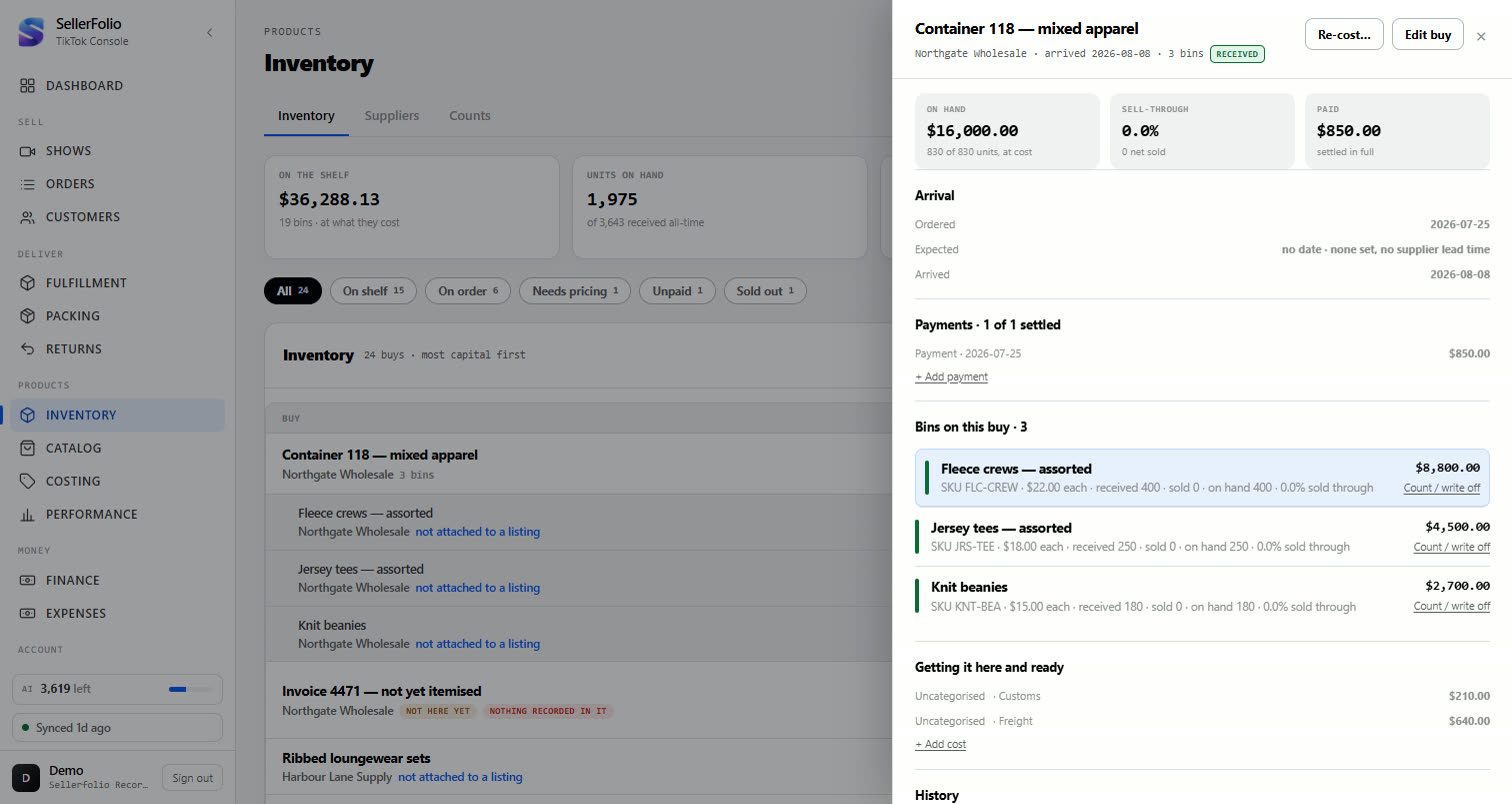
Open a bin
Click any row. The card shows where the units went and what the bin is worth now.
- Depletion — received, net sold, shrinkage and on hand. These always add up to what came in.
- Value at cost — units on hand at what they cost.
- Ledger — every movement, newest first. This is what makes a count defensible weeks later.
What has not arrived yet
On order is a chip on this list rather than a screen of its own — it is the same rows, asked a different question. A buy sits there until its stock is received, and while it does, its units stay out of on hand and its money stays out of On the shelf. You can mark it arrived from the row itself.
Each on-order buy shows when it is expected, and how that date was arrived at is shown as plainly as the date:
| Reads | Means |
|---|---|
| Aug 8–12 | A window you typed. Your supplier said it. |
| expected Sep 15 | You gave one date rather than a window. One date is a date — it is read as that single day, not discarded for being incomplete. |
| no date | No window was typed. Sorted last. |
Sep 1–7 is not late on the 3rd, and flagging it then would train
you to ignore the flag — which is the one failure that makes a tracker worthless. Due soon
means the window opens within a week. And a buy with no expected date reads
unknown, never "on time": saying "on time" against nothing is an assurance
nobody earned.
A buy recorded with no bin line yet still appears as a row rather than vanishing until you
itemise it, tagged nothing recorded in it. Money committed against nothing
itemised is exactly the thing you want to see rather than lose.
Suppliers
The Suppliers tab totals your buying by who you bought from: how many buys, the average unit cost, what that stock has since earned, what is still on hand, and what came back refunded. It answers "who is actually worth buying from", which no single buy can.
A supplier can also carry an expected lead time — how long their orders usually take to arrive. It is worth setting, because it is what a future estimated arrival will be calculated from, but see the warning above: that estimate does not reach the screen yet.
Attach a bin to a listing
This is the step that costs your sales and draws the stock down. Everything before it is bookkeeping.
Open Costing → By listing
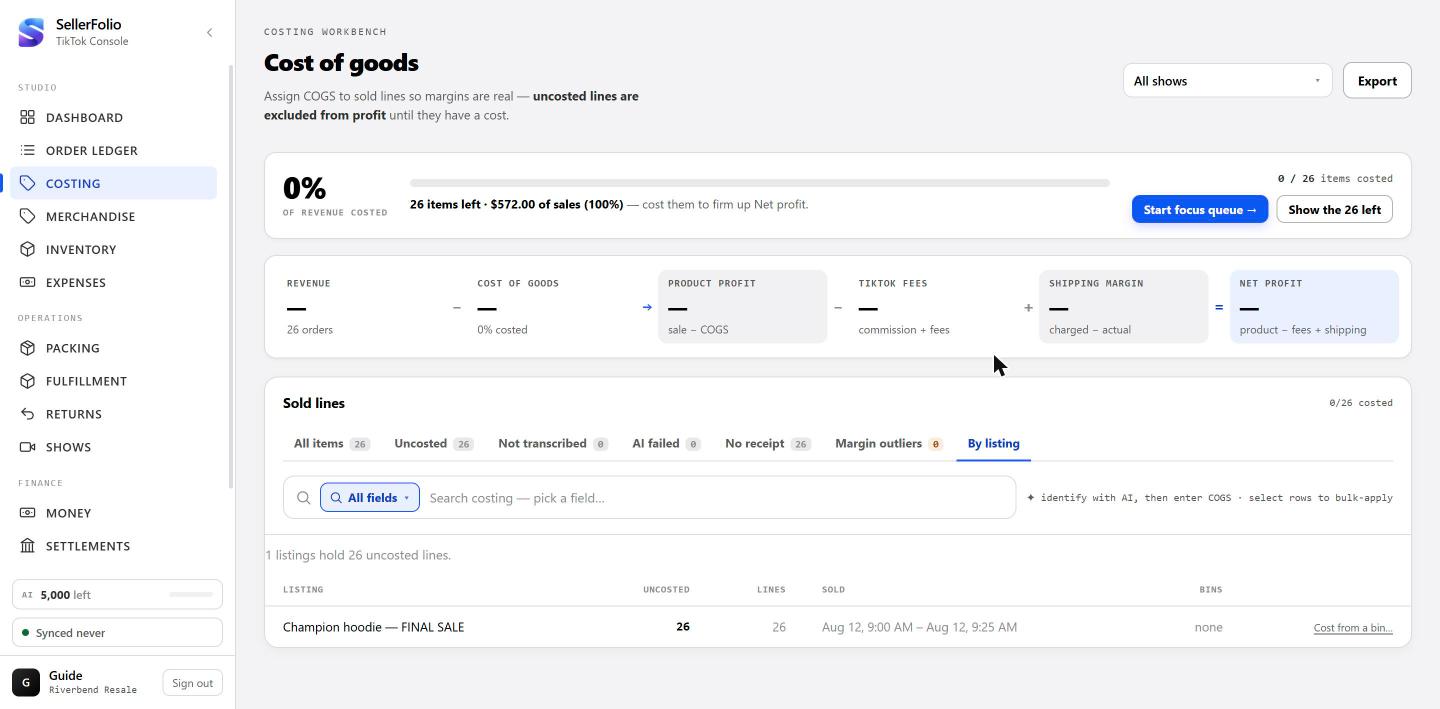
Binding starts from the sales, not from the shelf — so it lives in Costing, next to the lines that need costing. The By listing tab appears once you have recorded at least one bin; a shop with no stock never sees it.
Each row is one listing with uncosted sales on it, ranked by how many. Bins shows what is already attached.
Pick the bins that paid for those sales
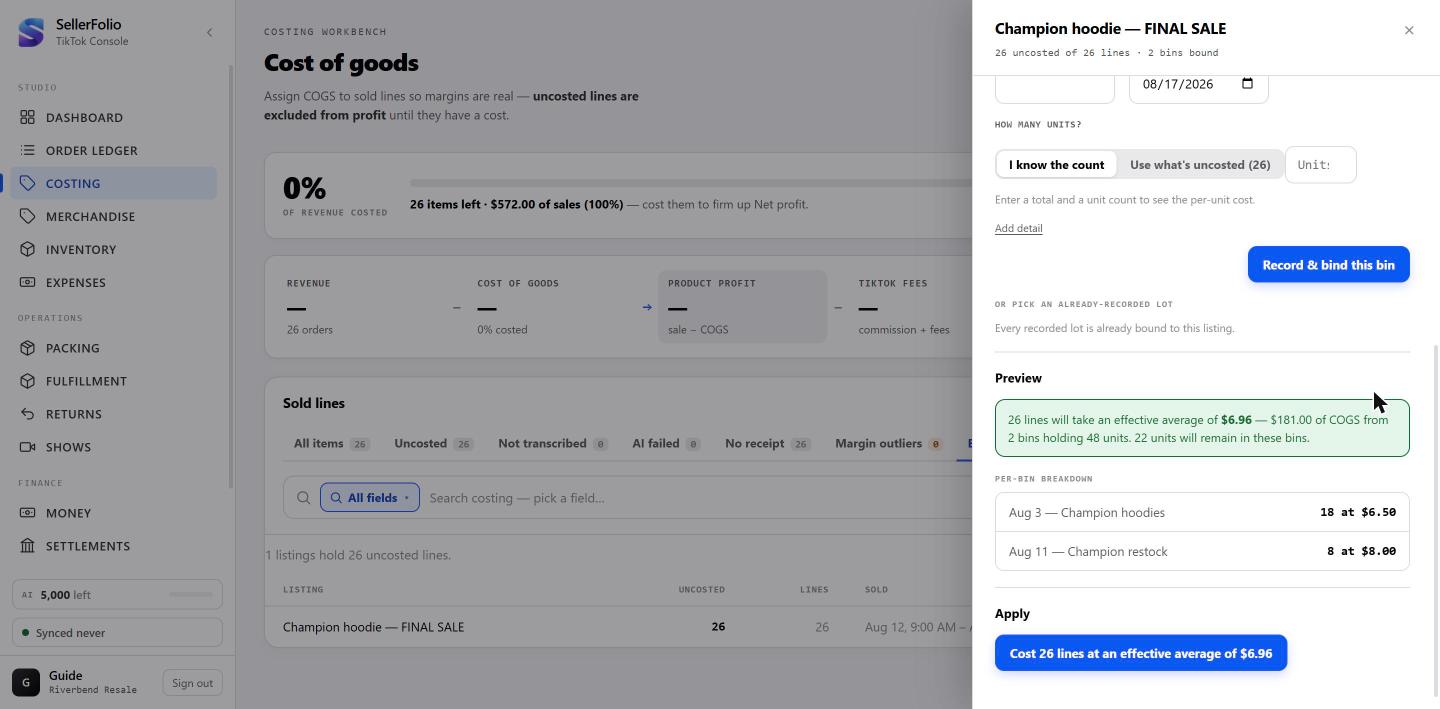
Click Cost from a bin… and add the bins the stock came from. Add more than one if the sales span several buys — order matters, because the first bin is drawn from first.
The preview does the arithmetic before anything is written: how many lines get costed, at what effective average, from which bins, and how many units are left over.
Choose FIFO or weighted average
Both answer the same question — when I sell one unit off this listing, what did that unit cost me? They only give different answers when more than one bin is attached at different prices. With a single bin, the toggle changes nothing, and you can leave it alone.
Say you attach two: 1,000 units at $11.52, then 500 at $6.00.
FIFO drains them in the order shown — that is what the ↑ ↓ arrows are for. The first 1,000 sales cost $11.52 each. From sale 1,001 on, they cost $6.00. Different lines carry different costs, and the changeover happens partway through.
Weighted average pools every attached bin and blends by units held: (1,000 × $11.52 + 500 × $6.00) ÷ 1,500 units = $9.68. Every line takes $9.68 — the first sale and the last alike.
Apply, and check the receipt
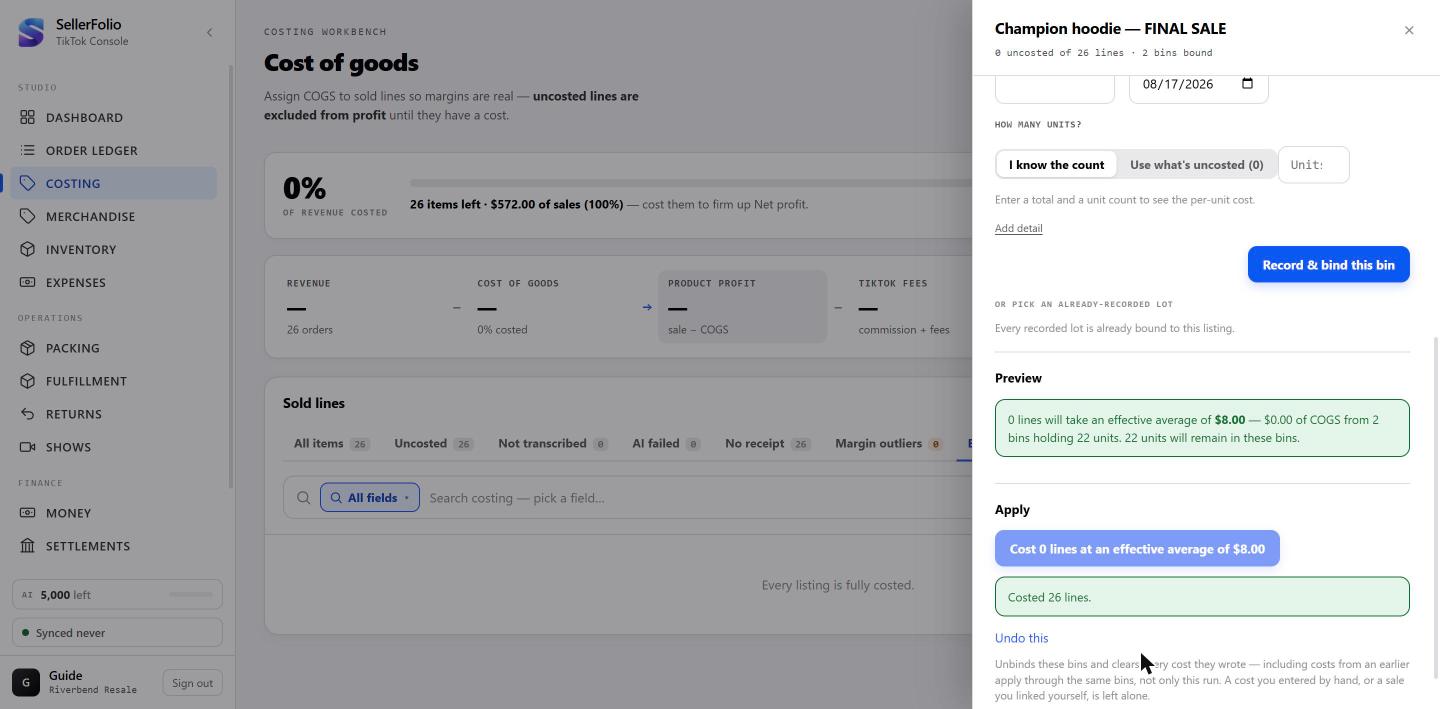
The button states what it will do before you press it. Afterwards the drawer tells you what it did, the listing drops to zero uncosted, and the units are off your shelf.
When the lines already have a cost
Apply normally fills in only the lines with no cost yet. That is what keeps it safe to press twice. It also means a listing whose sales were already costed some other way — by hand, by an AI suggestion, from the SKU catalogue — has nothing for a bin to do, and the drawer says so plainly: 0 lines, $0.00 of COGS, and a greyed-out button.
To make the bin take those lines over anyway, tick Replace existing costs. It appears inside a warning that first tells you what you are about to overwrite, broken down by where each cost came from — because "388 from an AI suggestion" and "12 you typed by hand" are worth very different amounts of hesitation. The counts in that warning follow the same scope as everything else: replace from a selection of 38 and it names 38.
Split one buy across several products
For the case Part 1 cannot handle: one total, several different things, none of them worth the same.
Tell the two cases apart
A buy that held one product needs nothing here. Part 1's form takes a total and a unit count, and the per-unit cost falls out of the division — $1,200 over 100 units is $12.00, and the bin is priced the moment you record it.
A buy that held several different products has no such division. One invoice, one total, and the things in the box are not worth the same. That is what Buys is for: record the buy once with a line per product, then decide how the total splits between them.
Open Inventory and leave the list on Grouped. Each buy is a row you
can open — the total on the right, then a line per product with Qty, Unit cost and
Expected resale. On a new buy the Unit cost column reads — all
the way down, because nothing has divided the total yet. The Allocate… button on
the buy opens a dialog with two ways to divide it: Evenly and
By expected resale.
Allocate — Evenly
Every unit on the buy carries the same cost: the total divided by the number of units, whichever line they sit on. A $1,200 pallet holding 10 jackets and 50 tees prices all 60 units at $20.00 each.
That is right when the things in the box are interchangeable — one carton of the same tee in six colours, a case of the same phone case. It is wrong the moment they are not. At $20.00 a unit, a tee you expect to sell for $20 shows no margin at all, while a jacket you expect to sell for $200 shows 90%. Neither figure is true. They are one piece of arithmetic applied to two things that never cost the same to buy.
Allocate — By expected resale
By expected resale splits the total in proportion to that column. It column is the weight, and it is the only thing this mode reads.
Same $1,200 pallet — 10 jackets you expect to sell at $200, 50 tees you expect to sell at $20:
- The jackets are 10 × $200 = $2,000 of expected resale, the tees 50 × $20 = $1,000. $3,000 between them.
- The jackets take two thirds of the pot — $800 — over 10 units, so $80.00 each.
- The tees take the other third — $400 — over 50 units, so $8.00 each.
Now check the margins, because that is what the mode is really doing: $200 − $80 is $120 on a $200 jacket, and $20 − $8 is $12 on a $20 tee. Both are 60%. Weighted lands every line on the same gross-margin percentage — which is the honest answer when a single invoice bought two things and nothing on it says what each one cost.
Link one sale to one bin
Link to sale… at the end of a line attaches one specific sale to that bin by
hand. Search your uncosted sales, press Link on the one that came out of this
bin, and two things are written together: the sale gets this bin's unit cost, and the bin gets
a SOLD −1 movement so the bin actually goes down by one.
Both, in one transaction, deliberately. A cost with no movement behind it charges the money to your P&L while leaving the unit on the shelf — the bin never depletes, and its on-hand goes on offering stock that has already left.
The button only appears once the bin has a unit cost. Until then the cell reads
allocate first, because there is no figure to write.
Allocate again later, and what it will not touch
Press either button again whenever the buy changes — freight that invoiced late, a line you added, a mode you now think was the wrong one. It re-spreads from scratch, with one exception.
Lines already linked to a sale are locked. Their money comes off the pot at their full quantity — every unit on the line, not only the ones sold — and only the remainder spreads across the rest.
Two refusals follow from that, and neither is a failure. If every line is linked, allocate stops and tells you there is nothing left to allocate. If the linked lines already account for the full total, it stops and tells you that instead. In both cases there is genuinely nothing to spread. Re-cost (Part 6) is the sanctioned way through the lock, and it states what it will rewrite before it does it.
When the total will not divide
A unit cost is stored to the cent, so a total that does not divide into whole cents cannot be represented exactly. The bin card says so rather than hiding it.
A real one: $11,515.00 across 1,000 units is $11.515 a unit. To the cent that is $11.52, and 1,000 × $11.52 is $11,520.00 — so the bin card reads $5.00 over-allocated, in red.
That is arithmetic, not a mistake. The gap is at most half a cent a unit, and no single per-unit price can do better than that. Nothing downstream is wrong either: the per-unit cost is what every sale gets charged, and it is exact.
If you want it to reconcile to the penny, split the line in two — 500 units and 500 units — and allocate again. They come out at $11.52 and $11.51, which multiply back to $11,515.00 exactly. That works because the remainder always lands on the last line of the buy: every other line gets its rounded fair share, and the last one gets whatever is left.
Count stock and write off what is gone
Counting records the difference, never a replacement — so the history stays readable.
Count what is actually there
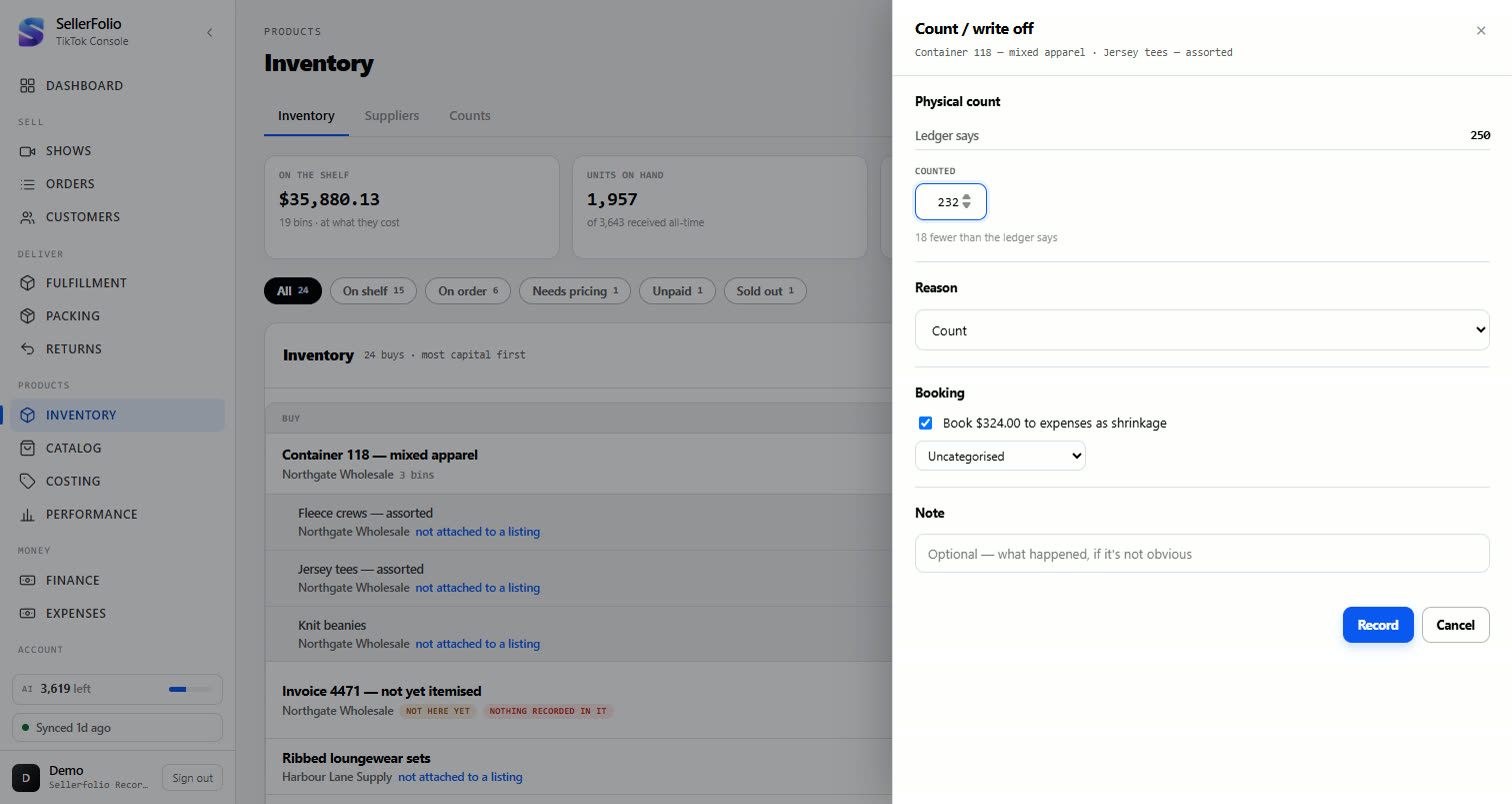
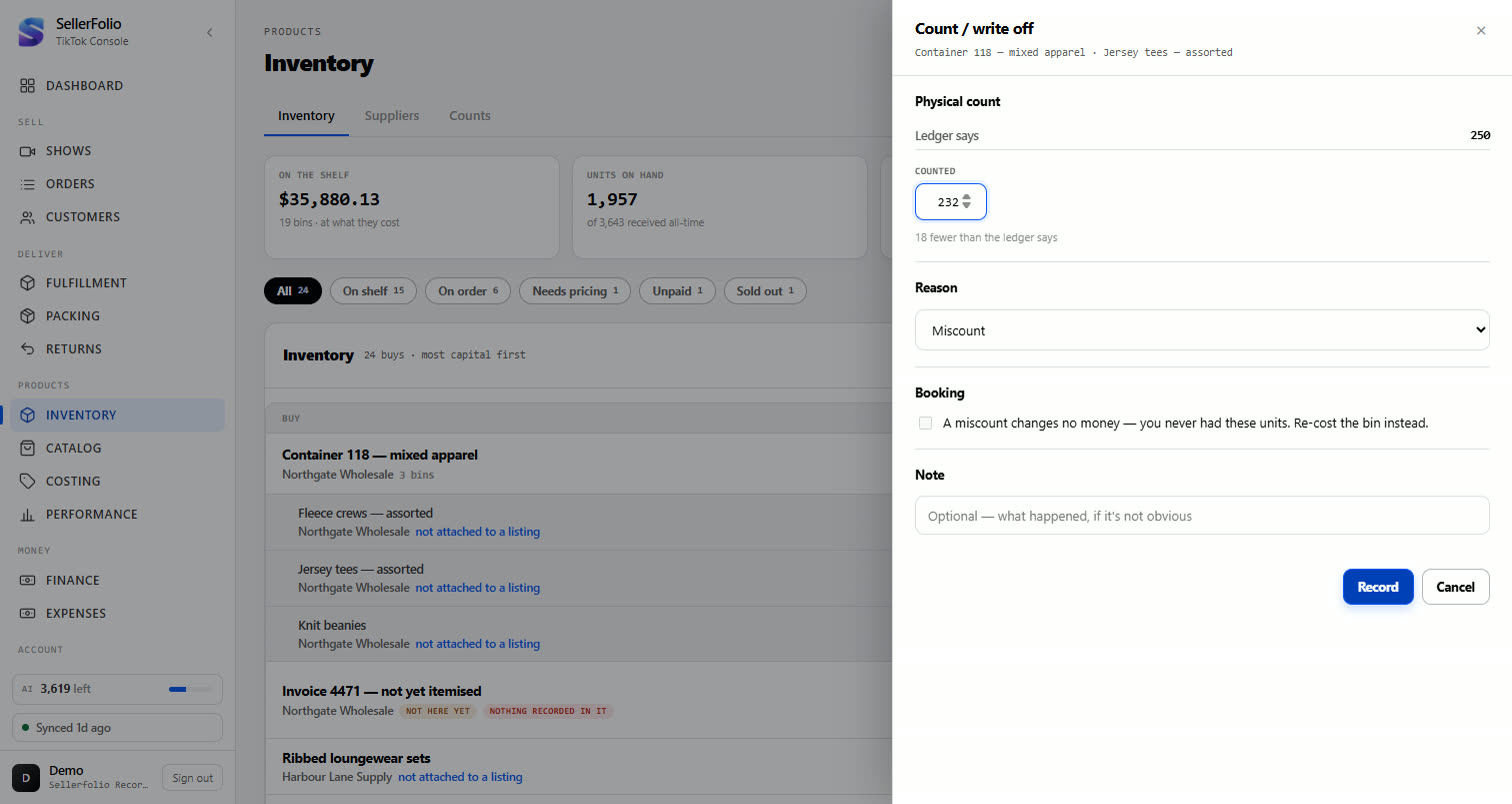
Open a bin and click Count / write off. Type what you physically counted. The variance is stated in words before you commit anything.
Pick the reason — it decides whether the loss reaches your expenses:
Decide whether it hits your P&L
The checkbox is ticked by default when the units are genuinely gone, and you can always untick it.
| Reason | What it means | Booked to expenses? |
|---|---|---|
| Damaged Lost Sample | The units existed and are gone. | Yes — ticked by default |
| Count | Fewer than expected, cause unknown. | Yes — a variance is a loss until you explain it |
| Miscount | You never had them. The delivery was short, or the original count was wrong. | No, and it cannot be |
Review counts, and undo a mistake
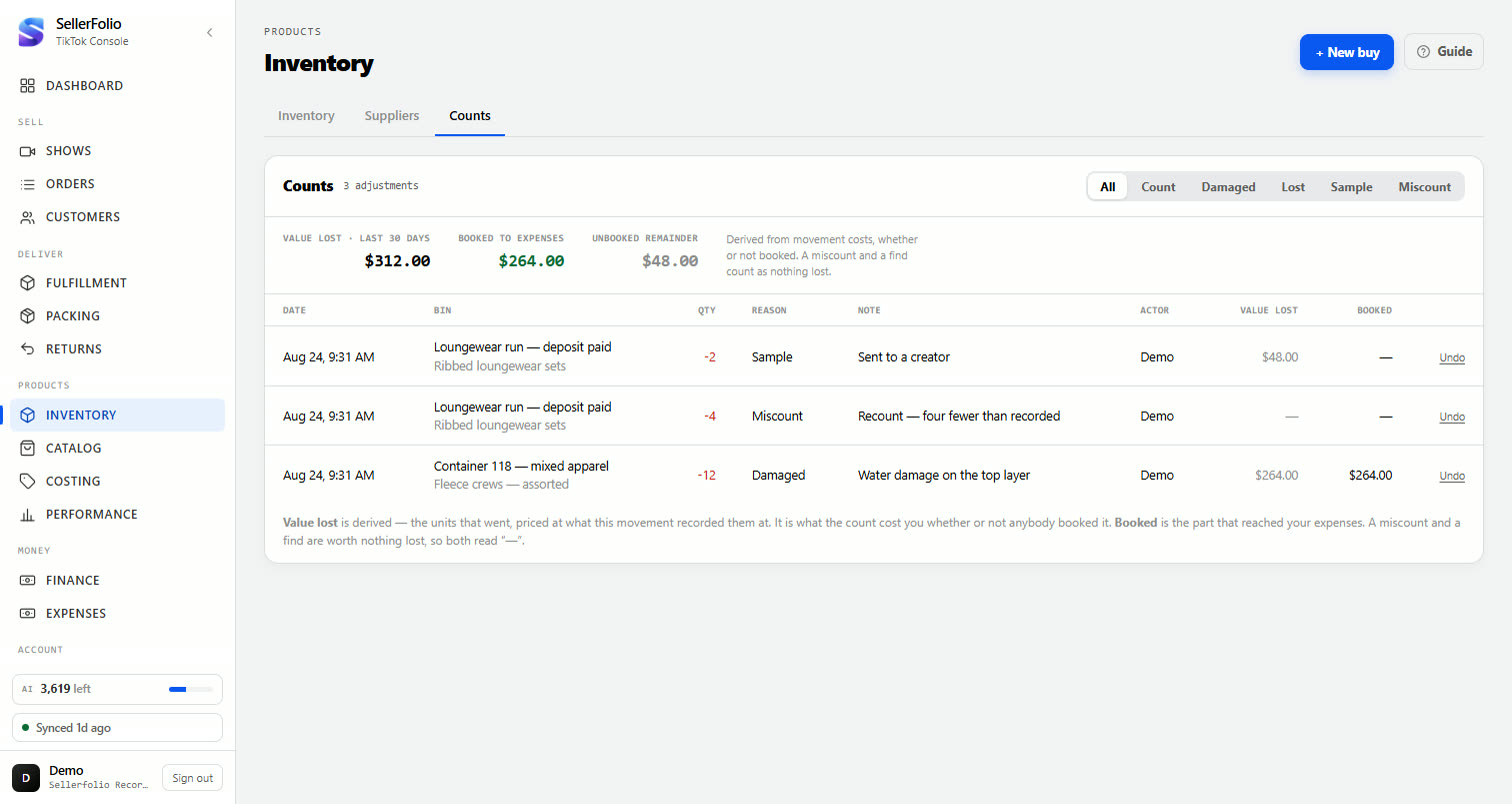
The Counts tab lists every count and write-off in the shop. Two money columns, and they are not the same thing:
- Value lost — what the units were worth, whether or not anyone booked it.
- Booked — the part that actually reached your expenses.
Fix a cost you got wrong
Re-cost spreads a buy’s real total back across its units.
Spot the gap
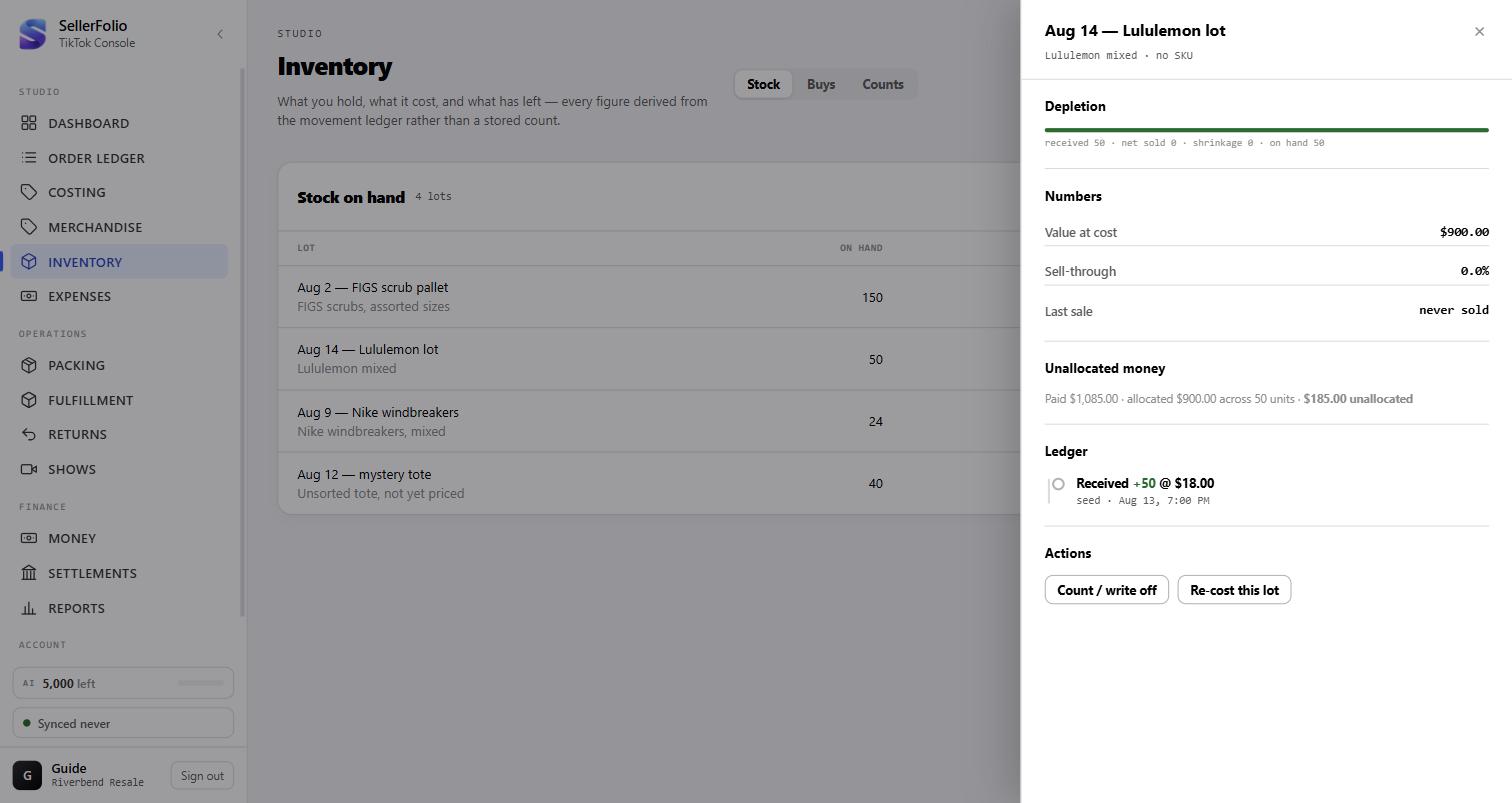
When what you paid does not match what reached the units, the bin card says so. It appears only when there is a gap — no line means the bin adds up.
Re-cost, after reading what it will do
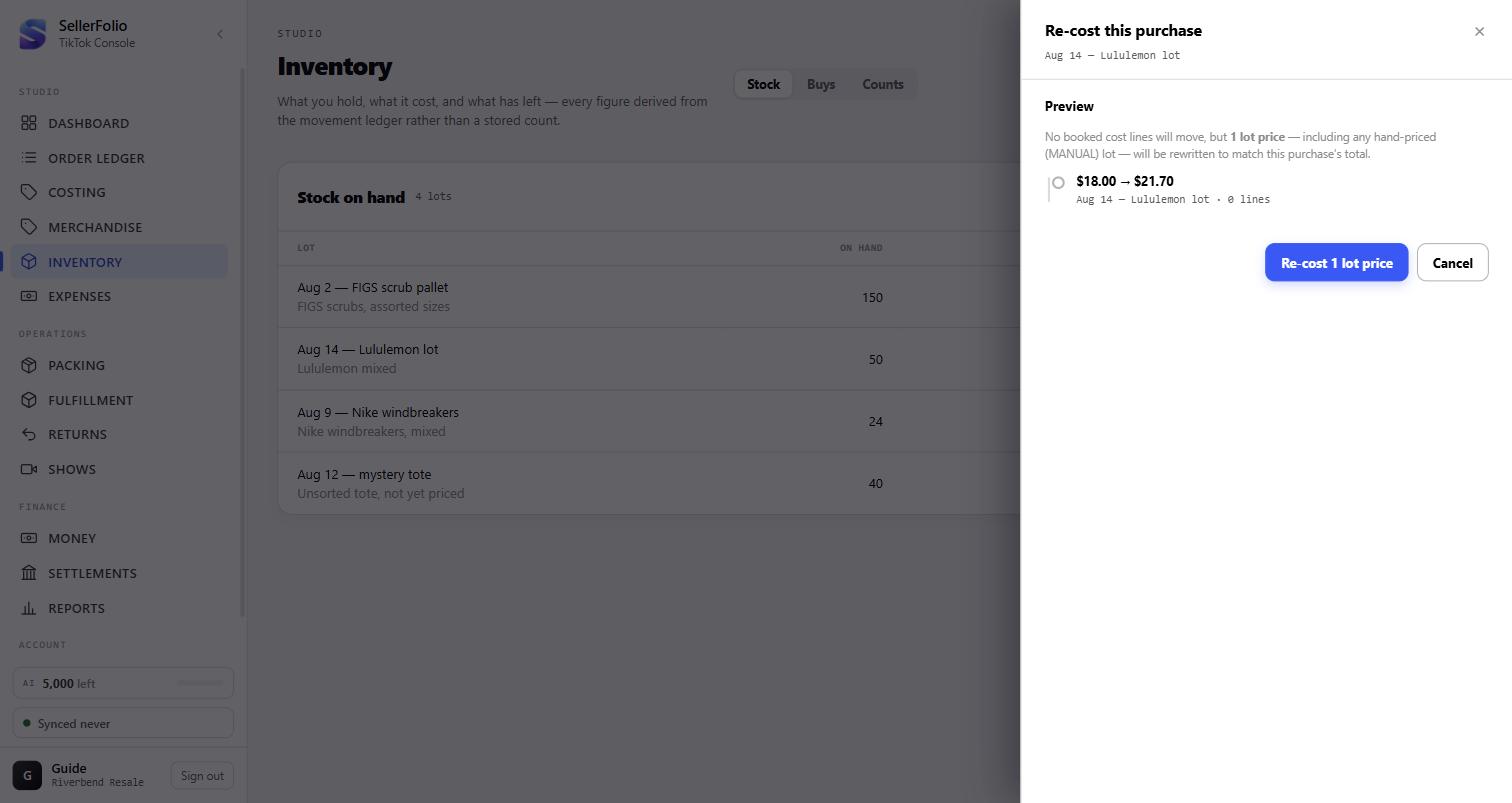
Click Re-cost this bin. Nothing is written until you confirm, and the dialog states the effect first — how many bin prices change, and how much cost of goods moves.
When something looks wrong
| What you see | What it means | What to do |
|---|---|---|
| Sell-through is 0.0%, last sale says never sold | Nothing is drawing that bin down — it is not attached to a listing yet. | Attach it to the listing its stock sells on (Part 3). |
| The By listing tab is not in Costing | It appears once you have recorded a bin. With no stock there is nothing to attach. | Record a buy (Part 1); the tab appears. |
| The preview says fewer lines than the listing has | The bins you attached do not hold enough units to cover every sale. | Add another bin, or apply what you have and attach more later. |
| By expected resale did nothing, and a message about expected resale | No unlinked line on that buy carries an Expected resale, so there is no weight to split the total by. Weighted refuses rather than guessing. | Fill in Expected resale on every line and press it again — or use Evenly if the items really are interchangeable (Part 4). |
| Allocate says every item is already linked | Every line on that buy has a sale attached, so every line is locked at the cost the ledger already charged. There is nothing left to spread. | Nothing is broken. If one of those costs is genuinely wrong, use Re-cost (Part 6) — the one sanctioned way through the lock. |
A bin shows $0.00 at cost |
You have not priced it — its cost is unknown, not zero. Or By expected resale priced it at zero because its Expected resale was blank (Part 4). | Re-cost the buy, or record its total on the buy itself. If a blank expected resale zeroed it, fill the column in and allocate again. |
| The booking checkbox is greyed out | Either the reason is Miscount, or the bin has no cost to book against. | For a miscount, re-cost instead. For an unpriced bin, price it first. |
| No booking line at all | You counted the same or more than the ledger says. Finding stock is not a loss. | Nothing — record the count. |
| An unallocated-money line you did not expect | The buy's total and its unit costs disagree — usually a mistyped total or freight added later. | Re-cost the bin, after reading what the dialog says it will rewrite. |
| A few dollars over-allocated on the same line | Rounding, not an error. A unit cost is stored to the cent, and this total did not divide into whole cents — the gap is at most half a cent a unit. | Nothing. To reconcile it to the penny, split the line in two and allocate again (Part 4). |
| Undo did not bring the stock back to the list | The list refreshes when you return to it. | Go back to the list; the count will be reversed. |
| Deleting a buy removed expenses too | Expected, and warned before you confirm: shrinkage booked against that buy’s bins goes with it. | If you only meant to fix a number, re-cost instead of deleting. |
Habits worth keeping
Record the buy when it arrives, not when it sells
A bin recorded weeks later is a bin whose freight nobody remembers. Four fields at the door is the whole job.
Count before you reorder, not after
The list is sorted by money tied up. The bins at the top are where a counting error costs the most, and they are the ones a reorder decision hangs on.
Say why in the note
"water damage on the bottom layer" explains a $54 write-off six months later. The reason code alone does not.
Reach for Re-cost before Delete
Re-cost fixes a number and leaves the history. Deleting a buy takes its bins, its counts and any shrinkage those counts booked.