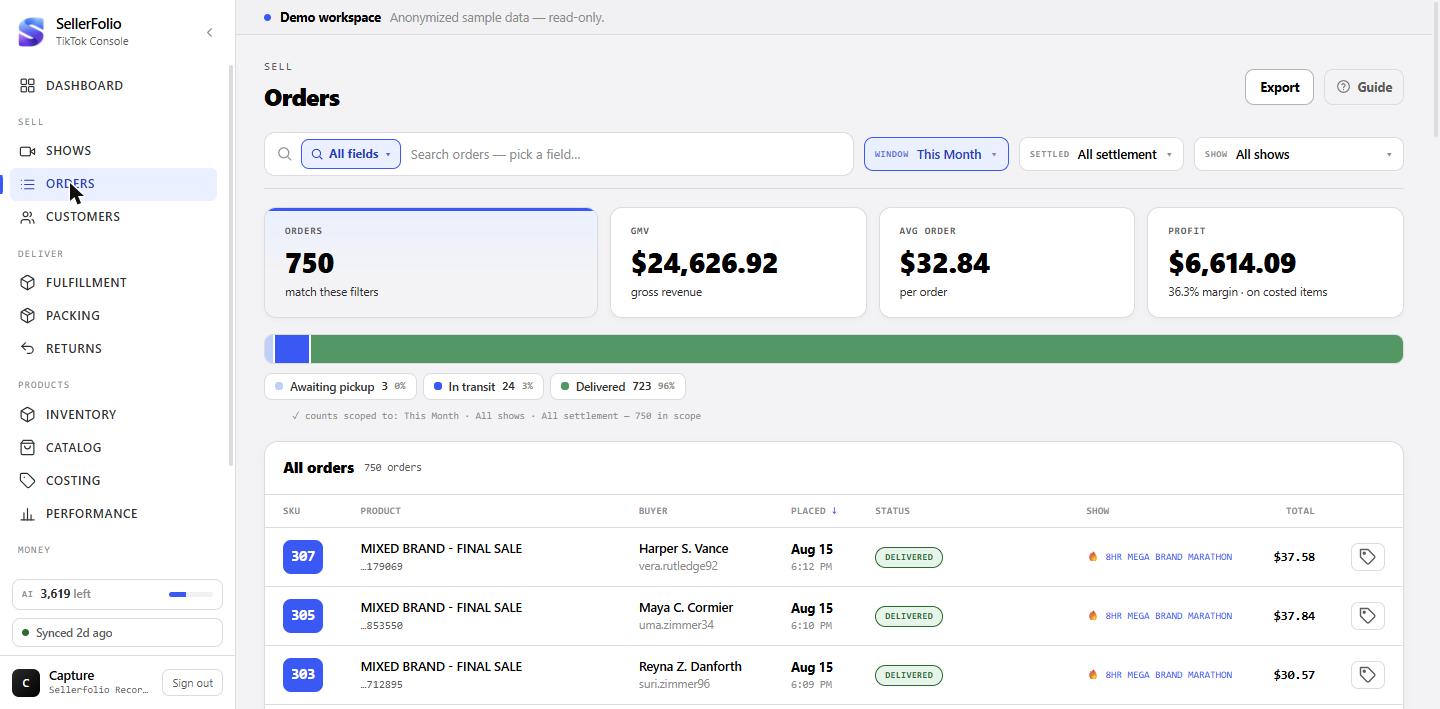
Two jobs, and they use the screen differently:
- Find an order. Search by buyer, tracking number, SKU, or anything the AI read off the video receipt, then open it. (Parts 1 and 4.)
- Read a period. Pick a window, a show and a settlement state, and read the four figures and the stage strip above the table. (Parts 2 and 3.)
Parts 5 to 9 are the drawer. A reference section at the end lists every column, every status in TikTok's own vocabulary, and the things this screen genuinely cannot tell you.
Narrow the ledger
Four controls sit under the title. They all scope the same thing — which orders exist for everything below them.
The time window
This Month, Last Month, Last 7 / 30 / 90 Days, This Year, All Time. It opens on This Month, which means from the 1st of the current month with no upper bound — so it includes an order placed a minute ago. Only Last Month has both ends closed; the rest run from a start date up to now.
There is deliberately no custom date picker here. Screens that need one pair it with their own inputs; this list shares its timeframe list with the Dashboard.
The settlement filter, and the orders it hides from both sides
Settled is orders TikTok has finalised. Awaiting settlement is narrower than it sounds: it means TikTok has quoted an estimate for the order but not finalised it.
The show picker
Multi-select; empty means all shows. Each row carries the show's start time and duration underneath its name, and a show that is on air right now is tinted and badged. "On air" is inferred, not reported: TikTok's analytics has no record of a LIVE until it ends, so the only evidence a broadcast is running is that orders are still arriving — within the last 60 minutes, and only while the show has no recorded duration.
An order whose room we have no show record for shows in the table as
room …1234 — the last four digits of the live room id.
Search: pick a field, then type
The search box is field-scoped. Choose what you are searching in — All fields, Buyer, Order ID, Product, Tracking #, Location, SKU, or one of the AI fields the video receipt produced (Brand, Item, Color, Size, MSRP) — type, and press Enter to pin it as a chip. Chips combine with AND, so you can stack "Brand · AI = …" with "Size · AI = …" and get only orders matching both.
Every field is a case-insensitive substring, with one exception: SKU matches exactly, because a SKU is a discrete code and searching "84" must not pull "184".
Typing pauses for a third of a second before it asks, so the list settles rather than flickering per keystroke.
The four figures
They all describe the orders your filters selected. Three of the four are money and appear only if you can see money.
Orders, GMV, Avg order
Orders is the count matching the filters. GMV is the sum of the buyers' checkout totals, and Avg order is simply GMV divided by that count.
The fourth card has two forms, and they are not the same number
If the window has enough finance and cost data, the card reads Profit — the net result over the costed orders: goods margin, less TikTok's fees, plus whatever shipping margin has actually been billed. If it does not, the card falls back to Gross profit, which is sale price minus cost over the costed line items and nothing else — before fees, before shipping. Its small print says so.
With neither available the card greys out and reads add SKU costs in Costing. That is a real answer, not a failure: no line item in the window has a cost yet.
And the caveat that applies to every version of this card: an uncosted line contributes revenue and no cost, so it flatters the result. The small print carries the coverage percentage — the share of line items that have a cost — for exactly that reason.
The stage strip
One bar split into fulfilment stages, with a legend underneath. It is both a picture and a filter.
What each stage holds
Six stages, each gathering one or two of TikTok's statuses: Unpaid, To ship, Awaiting pickup, In transit, Delivered and Cancelled. A stage with nothing in it is not drawn at all, and the bar always fills to 100% of the stages that are drawn — so the percentages in the legend and the widths of the segments always agree.
UNPAID with ON_HOLD, and those are opposite
situations. An unpaid checkout carries a full total the money was never captured for; an
on-hold order is paid money awaiting resolution. The difference shows up immediately below:
on-hold orders are in the default view and unpaid ones are not.
Why the strip's total is bigger than the Orders card
This is the single most confusing thing on the screen, and the caption under the strip explains it rather than leaving you to work it out. The strip counts every status in scope. The Orders card and the table run through the default view, which hides three statuses: cancelled, refunded and unpaid. So the two numbers are supposed to differ.
The caption names both: "counts scoped to: … — 490 in scope · 472 active (cancelled + unpaid hidden)" — illustrative figures, but the shape is real: the gap between the two is exactly the hidden statuses. With only the first number printed, the card's count looked unexplained and every percentage looked miscalculated.
Click a stage to filter to it
Clicking a segment or its legend entry filters the table to that stage's statuses; clicking the active one again clears it. This is how you see cancelled or unpaid orders at all — they are hidden until you explicitly ask.
While a stage is selected the strip does not collapse to a single segment. It keeps showing the full distribution, because the pills are the status filter and a strip that agreed with itself would tell you nothing. The caption switches to "showing N" for the same reason — with a stage picked, that number is the size of that stage, not of the active population.
Everything else does scope the strip — time window, show, settlement state and the current search. Searching an order id shows you which stage it sits in, which is the point.
The table
Fifty orders a page. Every row opens the drawer.
Reading a row
The Product cell carries the first line item's name, the last six characters of the order id beneath it, and — when there is one — a badge. "3 items" means this order has three line items. "◫ 3 orders" is different: it means this buyer placed three orders in this show, which is a shipping signal, not an order-size one.
The Status cell prints the status as a coloured pill, and on a cancelled order adds the reason as a small line underneath. There is no separate reason column on purpose — only a few percent of orders are cancelled, so a column would be an empty cell on almost every row, while a subline costs nothing on rows without a reason and answers "why?" without a click on rows that have one.
Full reference for every column is in the table at the end.
The buyer name on a cancelled order will look wrong
It is not wrong; it is masked. TikTok replaces the recipient name with asterisks —
F******** V*** — on cancelled orders and on nothing else, and strips the
nickname from those orders too. It applies to cancelled orders specifically — no other
status is masked this way.
Sorting and paging
Three columns sort: Placed, Status and Total. Clicking a sorted column flips its direction; clicking a new one starts it descending. Any sort change returns you to page one, as does any filter change. Pages are fifty orders.
Reprint a label
Rows with a tracking number carry a small label button at the right end. It re-fetches the label PDF you already bought and opens it in a new tab, where your browser's PDF viewer does the printing. It never re-buys postage.
An empty table and a broken table say different things
"No orders match these filters" means exactly that. A failed load says "Couldn't load your orders" with a Retry button and the explicit line "This is a load failure, not an empty period — orders in this window may well exist."
Export
Export in the header writes an .xlsx of every order
matching your current filters — not the fifty on screen — up to a ceiling of 20,000 orders.
It is fetched fresh in batches, so a large export takes a moment; the button says
"Exporting…" while it runs and is disabled when nothing matches.
The sheet carries everything this screen can see, not only the columns in the table. Each order brings its status and timings, the show it sold in, the buyer and the address it shipped to, the AI identity from the video (brand, item, colour, size, status, confidence and a yes/no "Identified" column), tracking and carrier, the fulfilment type and every deadline, cancel attribution when it was cancelled, and the full money side — the checkout split, settlement state, fees, shipping charged against shipping actually paid, COGS, profit, and any discount or coupon legs once the statement is drilled.
Timestamps are written in your own timezone, so a date in the file is the date you saw on screen — and it falls inside the window the file says it covers.
A second Summary tab records what the file was scoped to: the window, shows, settlement state, status filter, search and sort, alongside the totals and the pipeline counts the screen was showing. An export you open weeks later can still tell you what it is.
If you cannot see money, every money column is left out of the file entirely rather than emitted blank, and the Summary tab says why.
Open an order: status and history
Clicking a row opens the drawer. The order id goes into the URL, so the link is shareable and the browser's Back button closes the drawer. Escape closes it too. The filters go into the URL as well — window, stage, show, settlement, search, sort and page — so the address bar always describes exactly what you are looking at, and sending someone that link shows them the same view rather than an unfiltered ledger.
The Status block's timeline is derived, not recorded
Five steps — placed, payment confirmed, label ready, in transit, delivered — with a sixth appended when the order was cancelled or refunded. Read it as a summary of where the status has got to, because that is how it is built: only "Order placed" and, when TikTok gave us one, the payment time are real timestamps. The rest light up because the status has passed the point they represent.
Why it was cancelled, and who did it
On a cancelled order the block adds Cancelled by, Reason, Cancelled at, and — only when TikTok said so explicitly — Buyer requested. The initiator resolves to plain English: You (seller), Buyer, TikTok (automatic). Anything TikTok sends that we do not model passes through as-is rather than rendering blank.
These fields are shown only when they exist, rather than on every cancelled order: orders cancelled before this shipped have none, and an empty "Cancelled by —" row reads as missing data instead of absent data.
The Money block
Two waterfalls — what the buyer paid, and what you receive — then the profit decomposition underneath. Present only for viewers who can see money.
Buyer paid, then You receive
The first waterfall is the checkout: item subtotal, shipping, tax, grand total — each row appearing only if the order carries it. The second is your side, headed You receive with a tag reading either settled or estimated. Everything below that heading is TikTok's finance view of the order: net sales, TikTok fees, shipping, net payout.
The note at the foot of the block — shipping and tax are collected and remitted by TikTok, not seller revenue — is the reason the two waterfalls do not simply subtract from one another.
Shipping: three rows, and one that says "not billed yet"
When the order carries a shipping split you get Shipping paid by buyer, Actual shipping cost and Net shipping. The middle row very often reads — not billed yet, and that is the single most important thing to understand about money on this screen.
Product profit and Net profit answer different questions
Product profit is the goods margin: net sales less what the item cost you. No fees, no shipping. It is the number that tells you whether the buying was good, and it stays solid even while shipping is unbilled. Net profit is the bottom line — the payout TikTok will actually make, less cost — so it moves with fees and with shipping and carries the (est.) suffix whenever either is provisional.
Cost (COGS) appears only once at least one line of the order has a cost recorded, and a line reversed by a completed return is excluded from it.
Discounts appear late, and only from the statement
The discount and coupon rows — seller discount, seller coupons, TikTok-funded discount, TikTok coupons — are read off the order's settlement statement, not off the checkout. An unsettled order has none, so the whole group is hidden rather than shown as zero. A Discount basis: settlement row states this on the face of the block.
Signs are TikTok's own and mean something: seller amounts are negative because they are your cost, TikTok-funded amounts are positive because TikTok reimburses them — their rows carry a tooltip saying the payout is unaffected.
The settlement receipt and the cost trail
Where the figures above came from, in TikTok's own words and in yours.
Show receipt
Collapsed by default and fetched only when you open it — most people opening a drawer never need it. Inside is one section per posting leg: the records TikTok actually posted for this order, oldest statement first, each itemised into its components with a signed amount, and closed by that leg's settled total. Hovering a component row shows TikTok's raw field name, which is the language to argue in if a figure ever has to be disputed with TikTok.
A leg's heading tells you what it is. An order posting reads Sale or Refund depending on the sign of its revenue. Anything else — a reserve, an adjustment — reads as its own type. And a not-yet-settled order can carry one synthetic leg headed Estimated — not yet settled: that is TikTok's own pre-settlement quote, kept visibly separate from settled fact and never mixed into it.
Per-item breakdown (live from TikTok)
Inside the receipt, once at least one settled leg exists, there is a link to ask TikTok for the per-SKU decomposition. This is the only line-level money TikTok exposes, and it is a real API round trip made on click — so it can be slow, and it can come back saying TikTok returned nothing for this order.
The Cost block, and its history
One row per line item: the resolved cost and, beneath it, where that cost came from — a manual entry, a cost-memory match, and so on. A line with no cost reads uncosted. A line reversed by a completed return is marked returned and is out of the P&L.
history on a costed line fetches its full audit trail: every change, with the old and new amounts, the source and who did it. One entry reads differently from the rest — "no cost applied — history disagreed with itself · cost memory" — and it records a non-event: cost memory looked at the past and declined to guess. Nothing was deleted; nothing was applied.
Package, shipping and tracking
Everything about the parcel this order travels in.
The Package block, and how sure it is
When an order has siblings, this block sums them into one package-level P&L and lists them; clicking a sibling swaps the drawer to that order without closing it. The badge in the heading tells you how much to trust the grouping:
- fulfill unit — these orders share a tracking number. They demonstrably ship as one package.
- est. — these are this buyer's orders in this show. They will probably ship together, but nothing has confirmed it yet.
The package waterfall follows the same honesty rules as the single-order one: fees read pending settlement until TikTok posts them, and cost reads incomplete unless every order in the package is costed — a partial sum would be a smaller, wronger number rather than a missing one.
Carrier scans
The real scan history, requested only for orders that have actually shipped — asking for scans on an order still awaiting a label would spend a request to print "no scans yet" on every unshipped order in the book. The block badges itself with how long the parcel has been silent, graded against the server's own staleness threshold rather than a number the browser made up, so this drawer and the fulfilment queue never call the same parcel two different things.
Shippo labels, and the write-back warning
If your role can buy shipping, the drawer lists any Shippo shipments bought for this order — outbound and return, with carrier, service, tracking and a link to the label — and offers Buy label and Return label. If the fetch fails or your role cannot buy shipping, the whole block is absent rather than empty.
The plain fields: shipping, SLAs, sales source
Shipping & tracking holds the tracking number (with a copy button), carrier, method and warehouse. Fulfillment SLAs holds ship-by and deliver-by times, and shows On hold only when the order actually is. Sales source names the show, the order type, the show's start and the live room id. Every one of these rows hides itself when its value is empty, so what you see is what the order carries.
The Parcel → button at the top of the drawer appears once there is a tracking number and jumps to this parcel in Packing. It only navigates; it changes nothing.
Items, splitting, and the video receipt
Items
Every line item with its SKU or variant name, TikTok's display and package statuses, and its sale price. A struck-through price beside it is the original, shown only when it differs from what the item actually sold for.
Splitting an order into packages
Under the items, an order with two or more line items offers Split into packages…. Clicking it asks TikTok whether this order may be split; if it may, you get a Package A / Package B toggle per line, and both packages must end up with at least one item.
After a successful split the drawer names the resulting packages and tells you to re-sync before they appear in the ship queue.
Video receipt (AI)
What the AI read off the show's receipt clip for this order: brand, item, colour, size, MSRP and a short summary. The block badges the transcription's status, and flags Low confidence when the AI was unsure — treat that as a prompt to check, not as a wrong answer.
Edit lets you correct any field by hand and the correction persists. Identify with AI queues an order that has no identity yet; Retry AI appears once a transcription has actually failed — never while one is still in flight, which would spend quota on work already running.
Identifiers
The full order id with a copy button and a link straight to that order in TikTok Seller Center, plus the seller SKU. This is the block to use when you need to compare what we show against what TikTok shows.
Something looks wrong
The stage strip's total does not match the Orders card
Correct and expected. The strip counts every status; the card and the table hide cancelled, refunded and unpaid orders unless you pick that stage. The caption under the strip names both numbers.
An order I know exists is not in the list
Three usual causes, in order of likelihood. Its status is one of the hidden three — click the Cancelled or Unpaid stage. Its order date is outside the window — the filter is on when the buyer ordered, not when anything happened since. Or the settlement filter is set: an order TikTok has not quoted at all is in neither Settled nor Awaiting settlement.
Shipping cost reads "not billed yet" on an order that shipped weeks ago
TikTok posts the carrier cost on its own schedule, generally a week or two behind the sale. Until it does, the honest figure is nothing — and the shipping margin excludes the order rather than assuming a free label. It will fill in.
Profit reads higher than it should
Check the coverage percentage in the card's small print. Every uncosted line contributes revenue and no cost, so a half-costed window overstates profit by construction. Costing is where that is fixed.
The buyer's name is a row of asterisks
TikTok masks recipient names on cancelled orders, at the source. Nothing is broken and there is nothing to fix — the unmasked name exists on that buyer's other orders.
Two figures for the same order disagree between here and Finance
Almost always the clock. Everything here is dated by the order; Finance dates by the statement or by the payment, depending on the tab. Neither is wrong — they are answering different questions.
Every column, every status
What each thing on the screen is, and where it comes from.
The ledger's columns
| Column | What it holds |
|---|---|
| SKU | The seller SKU of the order's first line item. A dash when it has none. |
| Product | The first line item's product name, with the last six characters of the order id beneath. A "N items" badge means N line items on this order; a "◫ N orders" badge means this buyer placed N orders in this show. |
| Buyer | The recipient name, with the TikTok nickname beneath when there is one. Masked by TikTok on cancelled orders. |
| Placed | When the buyer placed the order — date above, time below, in your local time. Sortable; this is the field every filter and figure on the screen is dated by. |
| Status | TikTok's order status as a coloured pill, plus the cancellation reason as a subline on cancelled orders. Sortable. |
| Show | The show's name, or room …1234 when we have no show record for the
live room, or a dash for an order with no room at all. |
| Total | The buyer's checkout total for this order. Sortable. Absent entirely without permission to view finances. |
| (unnamed) | The reprint-label button, on rows that have a tracking number. |
Order statuses
TikTok's vocabulary on the left, how it reads on screen in the middle, and which stage of the strip gathers it. The last column is the one that catches people: three statuses are hidden from the table and from the Orders count until you select their stage.
| TikTok status | On screen | Stage | In the default view? |
|---|---|---|---|
UNPAID | Unpaid | Unpaid | No — the checkout carries a full total but the money was never captured, so counting it as revenue would be wrong. |
ON_HOLD | On hold | Unpaid | Yes — this is paid money awaiting resolution, despite sharing a stage with unpaid. |
AWAITING_SHIPMENT | To ship | To ship | Yes |
AWAITING_COLLECTION | Awaiting pickup | Awaiting pickup | Yes |
PARTIALLY_SHIPPING | Partially shipped | In transit | Yes |
IN_TRANSIT | In transit | In transit | Yes |
DELIVERED | Delivered | Delivered | Yes |
COMPLETED | Completed | Delivered | Yes |
CANCELLED | Cancelled | Cancelled | No — select the Cancelled stage to see these. |
REFUNDED | Refunded | Cancelled | No — same stage, same exclusion. |
The drawer's blocks, and when each appears
| Block | Appears when |
|---|---|
| Status | Always. Cancellation rows only when TikTok recorded an initiator or a reason. |
| Shippo label → TikTok | An outbound Shippo label exists whose tracking TikTok never received — or you have just fixed that. |
| Money | You can view finances. The "You receive" half needs a payout figure to exist; the discount rows need a drilled statement. |
| Settlement receipt | You can view finances. Its contents load only when you open it. |
| Cost | You can view finances. |
| Package | The order has at least one sibling — same tracking number, or the same buyer in the same show. |
| Buyer & shipping | Always. Individual rows hide themselves when empty. |
| Shipping & tracking | Always. |
| Carrier scans | The order has a tracking number, or its status has reached pickup or beyond. |
| Shippo labels | The Shippo lookup succeeded — which needs permission to buy shipping. |
| Fulfillment SLAs | Always. |
| Sales source | The order has a show, a room id or an order type. |
| Items | Always. The split control needs two or more line items. |
| Video receipt (AI) | Always — as an identity, or as "Not identified yet" with the action to fix it. |
| Identifiers | Always. |
What this screen cannot see
Gaps the code is explicit about. None of these is a bug; each is a limit worth knowing before you draw a conclusion from a blank.
- Whether a video receipt was ever captured. "No transcript" and "not finished transcribing" are the same absence here. Only the server can tell them apart, and only when you press the button.
- A label's real cost, until TikTok bills it. Not an estimate, not a zero — nothing. Shipping margin excludes the order until then.
- Discounts and coupons, until the order's statement is drilled. They come from the settlement legs, not from the checkout, so an unsettled order shows none.
- TikTok's own per-line money, without asking live. The fee, shipping and payout shares against each line in this drawer are our pro-rata split of the order total. The per-item breakdown is the only place TikTok's real per-SKU figures appear.
- A buyer's real name on a cancelled order. Masked at the source, on every cancelled order and on none of the others.
- Whether an order will ship with orders from a different show. The package grouping here is same-tracking or same-buyer-same-show. Cross-show consolidation lives on Fulfillment.
- Anything on a statement clock. No figure here is dated by when TikTok posted it. For that, and for reconciliation, use Finance.
- Return and dispute detail. A returned line is marked as reversed and drops out of cost, but the return itself — its status, its evidence, its refund — lives on Returns.
Habits worth keeping
Read the strip's caption before you quote a count
It names both populations — what is in scope and what is active — so you always know whether the number you are about to say includes cancelled orders.
Search by field, not by "all"
Scoping a chip to Tracking # or SKU turns a fuzzy match into an exact one, and stacking two chips is far faster than scrolling a filtered page. All fields is the fallback, not the default habit.
Treat "not billed yet" as information, not as a gap
It is telling you the order's shipping story is unfinished. Judging a recent window's shipping margin is judging half a story; a closed month is the one to judge.
When a figure surprises you, open the receipt
The settlement receipt is the shortest path from "this number looks wrong" to "here is exactly what TikTok posted, in its own field names". Almost every disagreement resolves there.